Access Control and Audit Log
The Hub layers a per-site access control list on top of the existing QIE user management. Anyone who can log into the Hub dashboard can see the Sites Dashboard, but only operators with an ACL grant for a given site can open that site's admin UI through the proxy.
Every meaningful action (login, proxy open/close, site lifecycle,
bundle generation, cert revocation, ACL changes) is recorded both in
the hub_audit_entry table and in a dedicated hub-audit.log
file for off-host shipping.
Per-site access control
The ACL model
Three tables back the model:
- The existing QIE user table is the source of truth for who can log in to the Hub (local, LDAP, or OIDC users, the same auth path as engine mode).
- The
hub_site_acltable maps(site_id, username) → permission_level, a grant to an individual user. - The
hub_site_role_acltable maps(site_id, role_id) → permission_level, a grant to a QIE role. Every user assigned to that role inherits access.
Access is the additive union of the two. An operator can open a site through the proxy if they are a Hub administrator, or they have a direct user grant for the site, or the role they are assigned to has a grant for the site. The two grant types are independent. Revoking one does not affect the other. (A QIE user is assigned at most one role, so role resolution is a single lookup.)
The permission model in v1 is simple: a row in either table grants PROXY permission. Operators with no matching grant for a site cannot open that site through the proxy and the site is filtered out of their dashboard view.
| Permission Level | What it grants |
|---|---|
PROXY |
The right to open this site's admin UI through the proxy. Authentication to the remote QIE itself is unchanged. The operator still has to log in to the remote QIE separately |
A VIEW-only level (dashboard visibility without proxy access) is planned for a future release. In v1 every grant is PROXY.
Manage Access dialog
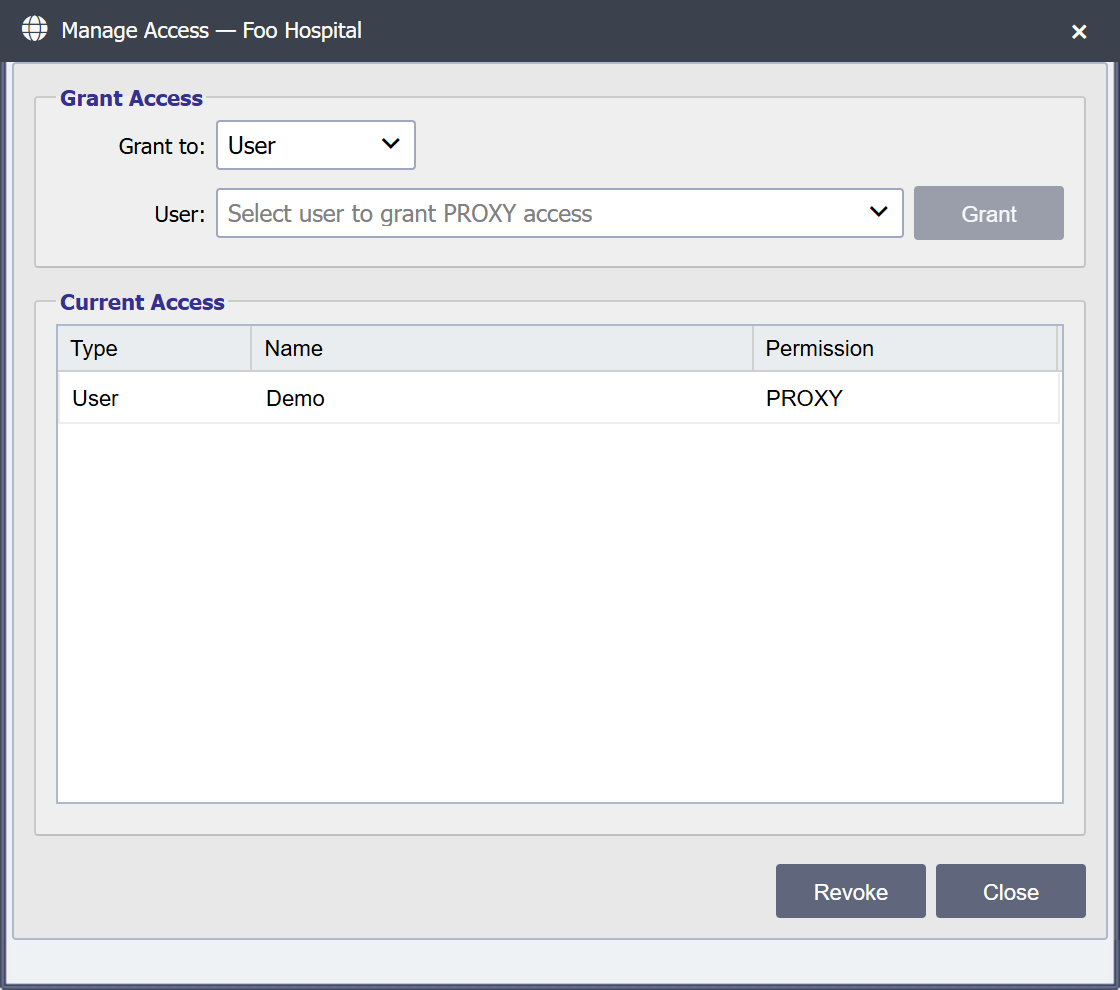
From the Sites Dashboard, select a site and click Manage Access in the toolbar. The dialog title shows the site display name:
The dialog has:
- A Grant to toggle that switches the picker between User and Role.
- A picker dropdown listing every QIE user (or role) that does not already have a grant for this site (subjects with an existing grant are filtered out).
- A Grant button (enabled when a subject is selected).
- A grid of current grants with a Type column (User or Role) and the subject name.
- A Revoke button (enabled when a grid row is selected).
- A Close button.
Granting access to a user
- Open the Manage Access dialog for the target site.
- Leave Grant to on User.
- Select a user from the dropdown and click Grant.
The Hub writes a hub_site_acl row and emits an ACL_GRANTED
audit event (with subjectType: USER). The dropdown re-populates with
the user removed and the grid refreshes with the new row visible.
Granting access to a role
- Open the Manage Access dialog for the target site.
- Set Grant to to Role.
- Select a role from the dropdown and click Grant. A confirmation prompt notes that every user assigned to the role gains access.
The Hub writes a hub_site_role_acl row and emits an ACL_GRANTED
audit event (with subjectType: ROLE plus the roleId/roleName).
Every user currently or later assigned to that role can open the site
through the proxy, and no per-user grant is needed.
Revoking access
- Open the Manage Access dialog.
- Click the row to revoke in the grid (user or role).
- Click Revoke. A confirmation prompt is shown. For a role grant it notes that users who only have access via that role lose it.
The Hub deletes the matching hub_site_acl or hub_site_role_acl
row and emits an ACL_REVOKED audit event. Affected users immediately
lose access. Any open proxy tab continues to render already-loaded
content but the next request returns 403 (unless they still have
access via the other grant path).
Tip
Hub administrators (users with the existing QIE administrator role) bypass the ACL check and can proxy to any site by default. The ACL applies to non-administrator users. To restrict administrator access as well, demote the user to a non-admin role and grant ACL rows explicitly.
What "no access" looks like
A user without an ACL row for a given site sees:
- The site is filtered out of their Sites Dashboard view.
- Direct navigation to
site-<label>.hub.example.com:8080returns HTTP 403 with a clear "no access" page (not a generic Spring error). - A
SITE_PROXY_OPENEDaudit event with anallowed: falsefield is recorded.
Audit log
The Hub writes an audit entry for every notable action. Audit entries are persisted twice:
- In the
hub_audit_entrytable for in-application querying. - In
hub-audit.logvia a dedicated log4j2 appender for off-host shipping.
Both writes are best-effort independent: a database failure does not suppress the file log, and vice versa. The intent is that investigators can reconstruct the full event timeline even if the database is unavailable or has been tampered with.
Event types
| Event Type | Emitted when |
|---|---|
HUB_LOGIN_SUCCESS |
A user authenticates to the Hub dashboard |
HUB_LOGIN_FAILURE |
An authentication attempt against the Hub dashboard fails |
SITE_PROXY_OPENED |
A user opens a proxy session to a site |
SITE_PROXY_CLOSED |
A proxy session ends (tab closed, session timed out) |
SITE_LOGIN_ATTEMPT_THROTTLED |
The login brute-force throttle rejected a request on the throttle → reject edge |
BUNDLE_GENERATED |
An operator generated a .qcb bundle file |
BUNDLE_REISSUED |
An operator generated a recovery / re-enrollment .qcb for an existing site |
BUNDLE_CONSUMED |
A bundle was successfully redeemed at /register (first-time enrollment or re-enrollment) |
BUNDLE_REUSE_REJECTED |
A /register attempt was rejected because of the bundle's own state. The reason detail says which: already-consumed, lost-commit-race (consumed by a rival registration during this one), or unknown (no such bundle id) |
BUNDLE_EXPIRED_REJECTED |
A /register attempt against a bundle past expires_at was rejected |
BUNDLE_REVOKED |
An operator cancelled an issued bundle before it was redeemed |
BUNDLE_REVOKED_REJECTED |
A /register attempt against a cancelled bundle was rejected |
CERT_REVOKED |
A cert was revoked (operator action, rotation, suspected compromise, decommission) |
SITE_REGISTERED |
A hub_site row was created, paired with BUNDLE_CONSUMED for first-time enrollment |
SITE_REKEYED |
An existing site's certificate was replaced in place via re-enrollment / recovery, paired with BUNDLE_CONSUMED; identity and history preserved |
SITE_DELETED |
An operator deleted a site row |
SITE_REGISTRATION_REJECTED |
A site's registration was refused. The reason detail says which: license-site-limit or failed-check-in-lockdown for a licensing refusal, subdomain-already-registered when the label is taken, registration-already-in-progress when another registration holds the mutex, site-changed-during-reenrollment, reenroll-site-not-found, or bundle-not-found. The bundle is untouched and stays redeemable once the cause clears, except for bundle-not-found, where the bundle row itself is gone and a new bundle is needed |
SITE_DISABLED |
An operator disabled a site |
SITE_ENABLED |
An operator re-enabled a previously disabled site |
ACL_GRANTED |
A hub_site_acl (user) or hub_site_role_acl (role) row was created; details_json.subjectType distinguishes |
ACL_REVOKED |
A hub_site_acl (user) or hub_site_role_acl (role) row was deleted; details_json.subjectType distinguishes |
TUNNEL_CONNECTED |
A remote QIE established a tunnel |
TUNNEL_DISCONNECTED |
A tunnel was closed (heartbeat loss, idle timeout, explicit close) |
TUNNEL_TAKEOVER_DETECTED |
A site connected while it already had an open tunnel. The new connection wins, the old is forcibly closed. Repeated takeovers are a security signal (see below) |
Entry shape
Each row in hub_audit_entry:
| Column | Notes |
|---|---|
id |
PK |
timestamp |
Indexed |
event_type |
One of the enum values above |
actor_username |
The user who performed the action (nullable when the action is unattributed, e.g. a /register POST, where the actor is a not-yet-trusted remote QIE) |
actor_site_id |
The site that initiated the action, for site-initiated events (TUNNEL_CONNECTED, BUNDLE_CONSUMED, etc.) |
target_site_id |
The site the action affects (SITE_DELETED, CERT_REVOKED, ACL_GRANTED, etc.) |
target_username |
The user the action affects (ACL_GRANTED, ACL_REVOKED, HUB_LOGIN_*) |
source_ip |
The originating IP, as the Hub saw it |
details_json |
Event-specific fields, see below |
The details_json column is an nvarchar(max) JSON object holding
event-specific fields. Examples:
SITE_PROXY_OPENEDincludes the resolvedsubdomainLabel, the initial request path, and anallowed: true|falseflag for the ACL decision.CERT_REVOKEDincludes the cert serial, revocation reason, and free-text details.BUNDLE_REUSE_REJECTEDincludes the rejectedbundleId.ACL_GRANTED/ACL_REVOKEDincludesubjectType(USERorROLE) and the subject (usernamefor a user grant, orroleIdplusroleNamefor a role grant), and thelevel(PROXY).
Log file
The dedicated appender writes one JSON document per line:
- Format:
%m%n. The message is the bare JSON document, no prefixed timestamp or log level (those are inside the JSON). - Rolling policy: size-based, 50 MB per file, up to 20 files retained.
- Logger:
com.qvera.qie.hub.audit,additivity=false. The audit logger does not echo anywhere else. Audit lines never appear inqie.log.
The 50 MB × 20 = 1 GB ceiling is intentional. Long retention happens off-host by shipping the file to a SIEM / log warehouse. Holding years of audit history on the Hub host itself is not the recommended deployment. It concentrates risk on a host that is already a tier-1 admin target. See Security Guidance.
Shipping off-host
The recommended deployment ships hub-audit.log to a SIEM or
log warehouse continuously. The Hub itself does not embed a
shipping client. The file format is intentionally simple so any of
the common log shippers work:
| Tool | Recommended config |
|---|---|
| filebeat | One input pointed at the file, JSON parser enabled, send to the SIEM of your choice |
| rsyslog | imfile module reading the file, forward over TLS to a central rsyslog or syslog-ng |
| vector | file source, json transform, any sink |
| fluent-bit / fluentd | tail input plugin, JSON parser, forward output |
Direct DB-to-SIEM streaming is not currently supported; the file is the integration point.
A built-in syslog appender configurable from the Hub UI is a near-term post-v1 item.
What Is NOT Audited
- Request/response bodies are never logged anywhere. They may contain PHI.
- Header values are not logged by default. The proxy logs the path but not the headers.
- Internal listener restart / Spring lifecycle events live in
qie.log, not the audit log. The audit log is restricted to operator-visible actions and security events.
Querying historical events
The audit table has composite indexes on:
(event_type, timestamp)for "all bundle generations this month" style queries.(target_site_id, timestamp)for per-site timelines.(actor_username, timestamp)for per-user activity reports.
The Hub dashboard includes a built-in Audit Log viewer (admin-only) that queries this table with server-side paging. It filters by time range (From, To), Event, User and Source IP.
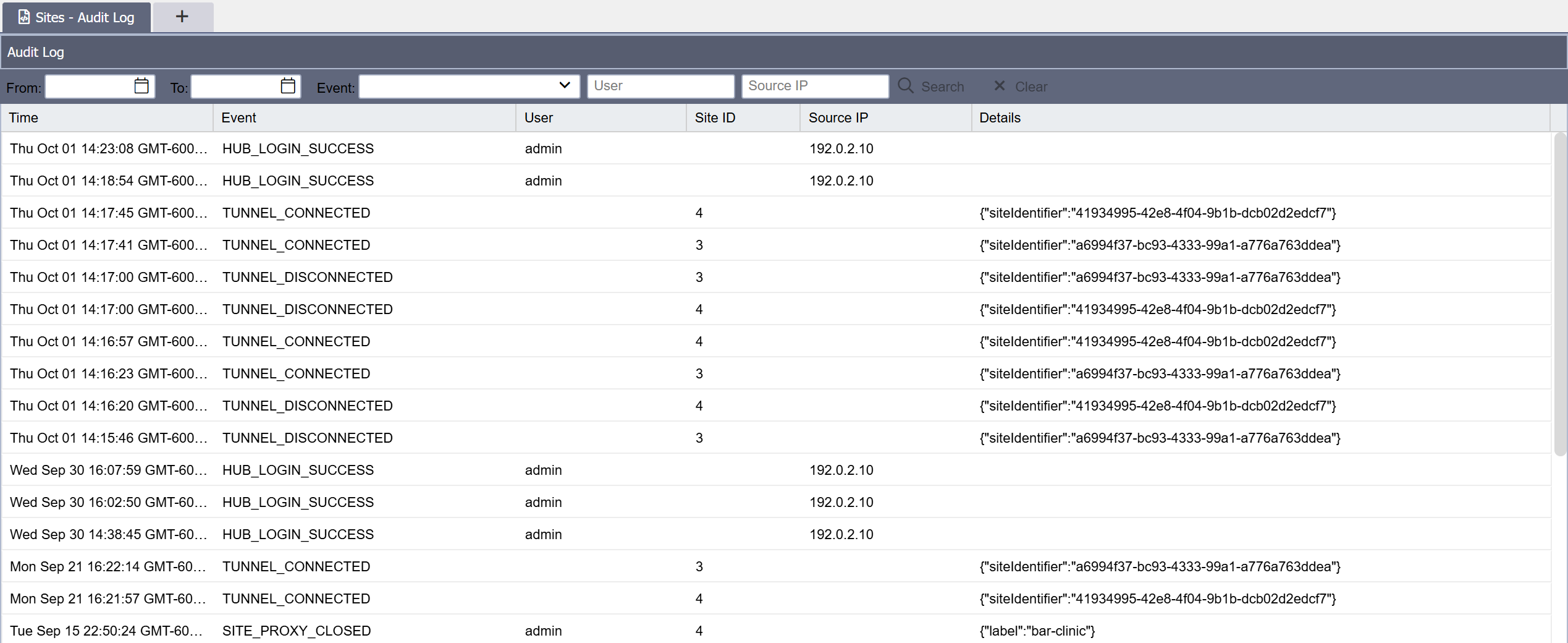 Customers running
their own SIEM can additionally ship the audit log file off-box as a
streaming query surface, with the database (and this viewer) as the
investigation-time consistency check.
Customers running
their own SIEM can additionally ship the audit log file off-box as a
streaming query surface, with the database (and this viewer) as the
investigation-time consistency check.
Tunnel takeover detection
TUNNEL_TAKEOVER_DETECTED events deserve special attention. They
fire when:
- A
hub_sitealready has an open tunnel. - A new tunnel arrives presenting the same client cert (same subject CN).
- The Hub accepts the new tunnel and force-closes the old one (the "newer always wins" semantic).
The legitimate cause is a dirty disconnect: a TCP-level interruption that did not close the WebSocket cleanly, followed by a quick reconnect before the heartbeat-loss timer expired. This happens routinely and is not by itself an alarm signal.
What is an alarm signal: rapid repeated takeover storms, e.g. two takeovers within 60 seconds, repeating every few minutes. This pattern indicates two QIE installations presenting the same client cert, alternately taking over the tunnel. The most likely explanation is cert exfiltration: an attacker has obtained the client cert and is connecting from a different host than the legitimate site.
Recommended response: revoke the cert immediately with reason
SUSPECTED_COMPROMISE. The legitimate site fails to reconnect and its administrator reports the outage; you can then investigate
the source of the leak before re-enrolling.
This signal is reliable because the Hub always knows the source
IP of every incoming tunnel. The takeover IPs are recorded in
source_ip on every event and a SIEM rule on the pattern is the
recommended detection.