Site Access Grants
A grant lets everyone holding a role do one kind of thing at the sites that carry any of the grant's tags. Grants belong to roles only: a Hub user's access is their role's. They are given in the Site Access section of the role, on the Manage Roles page. Only Hub administrators manage roles and tags.
Console, Jobs and MCP
There are three grants, and none includes another.
Console: Opens the site's console through the Hub's proxy, from Connect on the Sites Dashboard or from a bookmarked site address, and lists the site on the person's Sites Dashboard. Where the site lets Hub users sign in to its console, Connect opens it signed in as the person's Hub user (see Console Sign-In Through the Hub); otherwise the site shows its own login page.
Jobs: Lets the person prepare, approve and run jobs that reach the site, and roll the site back after a job (see Jobs). The Jobs page appears for Hub administrators and for anyone whose role holds Jobs at one or more sites.
MCP: Lets an AI assistant work at the site through the Hub as the person's Hub user (see MCP Calls Through the Hub). The Hub's job tools need both MCP and Jobs (see Job Tools on a Hub).
The site decides what the person's Hub user may do there, through its own Hub settings (see Hub Sign-In). A site that has not turned Hub sign-in on refuses everything the Hub signs for.
A person whose role holds Jobs or MCP at a site, but not Console, does not see the site on the Sites Dashboard unless they are a Hub administrator.
How Grants Reach Sites
A QIE user has at most one role, so a person's grants are their role's grants. A person without a role holds no grant.
Each grant on a role names one or more tags, and reaches every site that carries any of them. A grant for the built-in All sites tag reaches every site, including each site that enrolls later. Changing the tags a site carries, on the Tags page or in the site's Site Details, changes which grants reach it.
Hub Administrators
Hub administrators manage every site, tag and role, and see every site on the Sites Dashboard. Being an administrator opens no site's console: administrators hold Console, Jobs and MCP only through their role, the same as any other Hub user. At a site where their role lacks Console, Connect says so instead of opening the console.
An administrator manages roles, so an administrator can give their own role a grant. That change is written to the audit log like any other.
Giving a Role Grants
- Open System Administration -> Manage Roles and select the role, or click New for a new one.
- In Site Access, tick Console, Jobs or MCP.
- For each ticked grant, tick the tags it reaches. All sites reaches every site.
- Click Save.
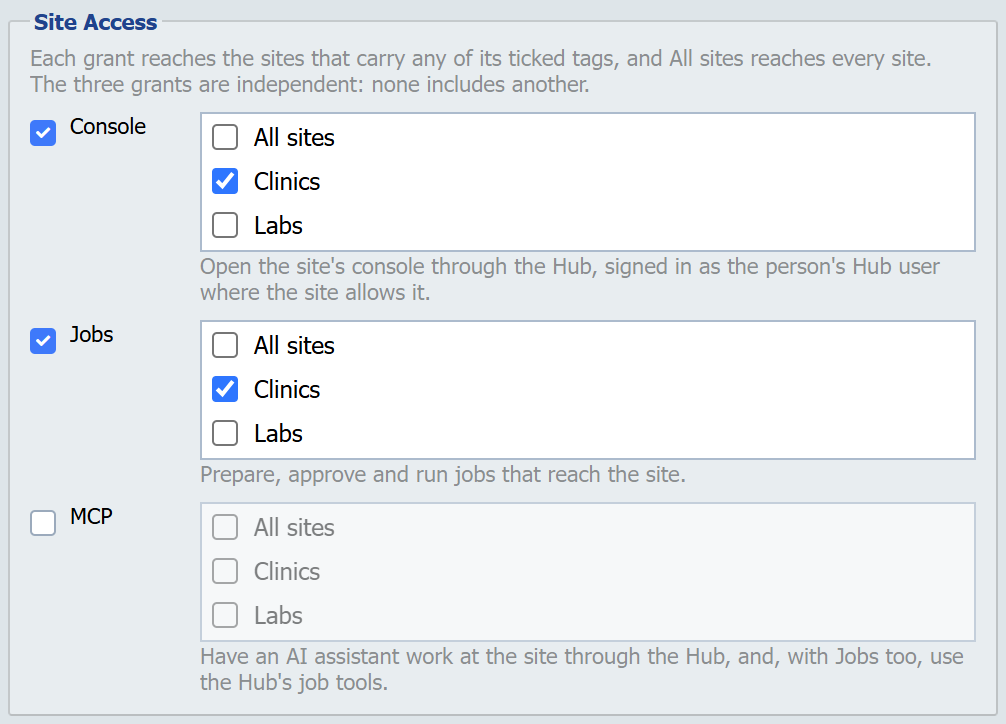
A ticked grant needs at least one tag: saving one with none names the grant and asks to tick a tag or untick the grant. Unticking a grant takes it away for every tag.
Save saves the role and its Site Access together. If a grant cannot be saved, for example because one of its tags was deleted in the meantime, nothing is saved: the role and its grants stay as they were, and a Save Role message says why.
The Hub writes a GRANT_ADDED audit event for each grant and tag added, and a GRANT_REMOVED event for each one taken away. Each names the role, the grant and the tag. The role's revision history shows its Site Access with each revision: under Site Access, the tags each grant named when that revision was saved.
Seeing Who Can Reach a Site
Select a site on the Sites Dashboard and click Access. The Access dialog lists every role grant that reaches the site, with its Role, Grant and the tag it reaches the site Through Tag. A grant for All sites is listed for every site.
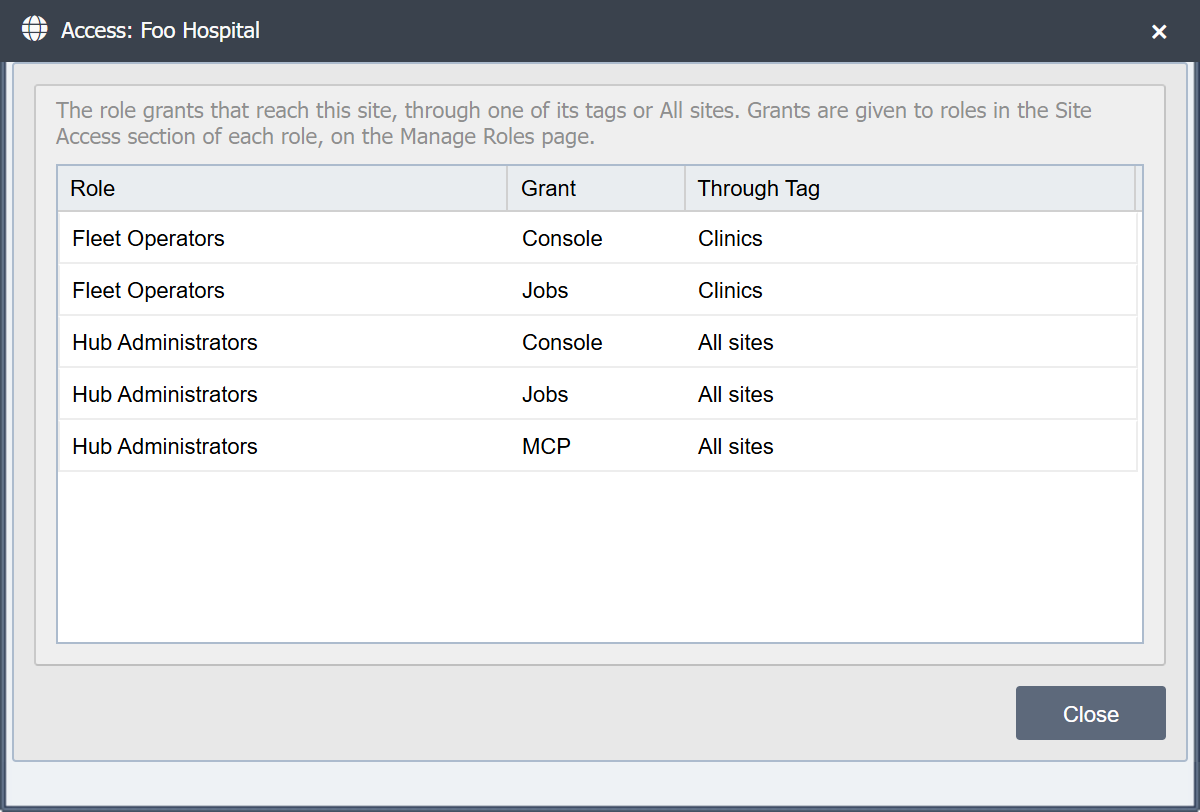
The dialog is read-only. Grants change on the Manage Roles page, and a site's tags on the Tags page or in its Site Details. Role grants are the only way to work at a site through the Hub, for Hub administrators too, so the dialog lists everyone who can.
When a Change Takes Effect
Jobs, MCP and console sign-in are checked against the database every time the Hub is about to sign a statement. A grant taken away therefore stops the next job step, rollback, AI call, answer to a site's confirmation question or console sign-in the Hub would sign for that person at that site.
Losing Console at a site also ends the person's Hub console sessions at that site, when they signed in there through the Hub. Console can be lost by taking the grant off the role, taking a tag off the site, or deleting a tag (see When the Hub Ends a Person's Console Sessions).
Opening a site through the proxy is checked on every proxied request, from a cache. A grant or tag change takes effect at the next request on the Hub node where the change is made, as does disabling, deleting or giving another role to a Hub user. Another node of an HA Hub can keep its cached answer for up to the cache's lifetime, set by the qie.hubProxyCacheTtlMs Java option (60 seconds by default; see HTTP Proxy).
What No Access Looks Like
Without Console at a site, a person cannot open its console through the Hub. A Hub administrator still sees the site on the Sites Dashboard, and Connect tells them their role lacks the grant; anyone else does not see the site. A direct site address is refused with HTTP 403, and the refusal is written to the Hub's log, not to the audit log.
Without Jobs at a site, a job the person submits leaves the site out, and a job whose preparer or approver loses the grant after it was submitted skips the site as "not permitted, not run". The person cannot approve a job unless they hold Jobs at every site it lists, or roll the site back.
Without MCP at a site, the Hub's MCP server treats the site as if it were not enrolled for that person.
When a Hub User or Role Changes
Disabling a Hub user, deleting one, giving one another role, or renaming their role ends their Hub console sessions at every site where a console sign-in through the Hub is on file for them. Grants belong to roles, so none is removed for the user, but a disabled user holds none of their role's grants: Connect opens no site's console for them and the Hub signs no console sign-in, job step or AI call for them.
A role can be deleted only when no user holds it. Deleting a role removes every grant it held, and the Hub writes a GRANT_REMOVED audit event for each, with the reason role deleted.
A running or paused job whose preparer or approver is disabled or deleted at the Hub stops (see Jobs).
Sites know a Hub user by the Hub's id and the user ID. A new Hub user created later with the same user ID is therefore the same person to every site, and takes over the deleted user's records there.