Hub Configuration
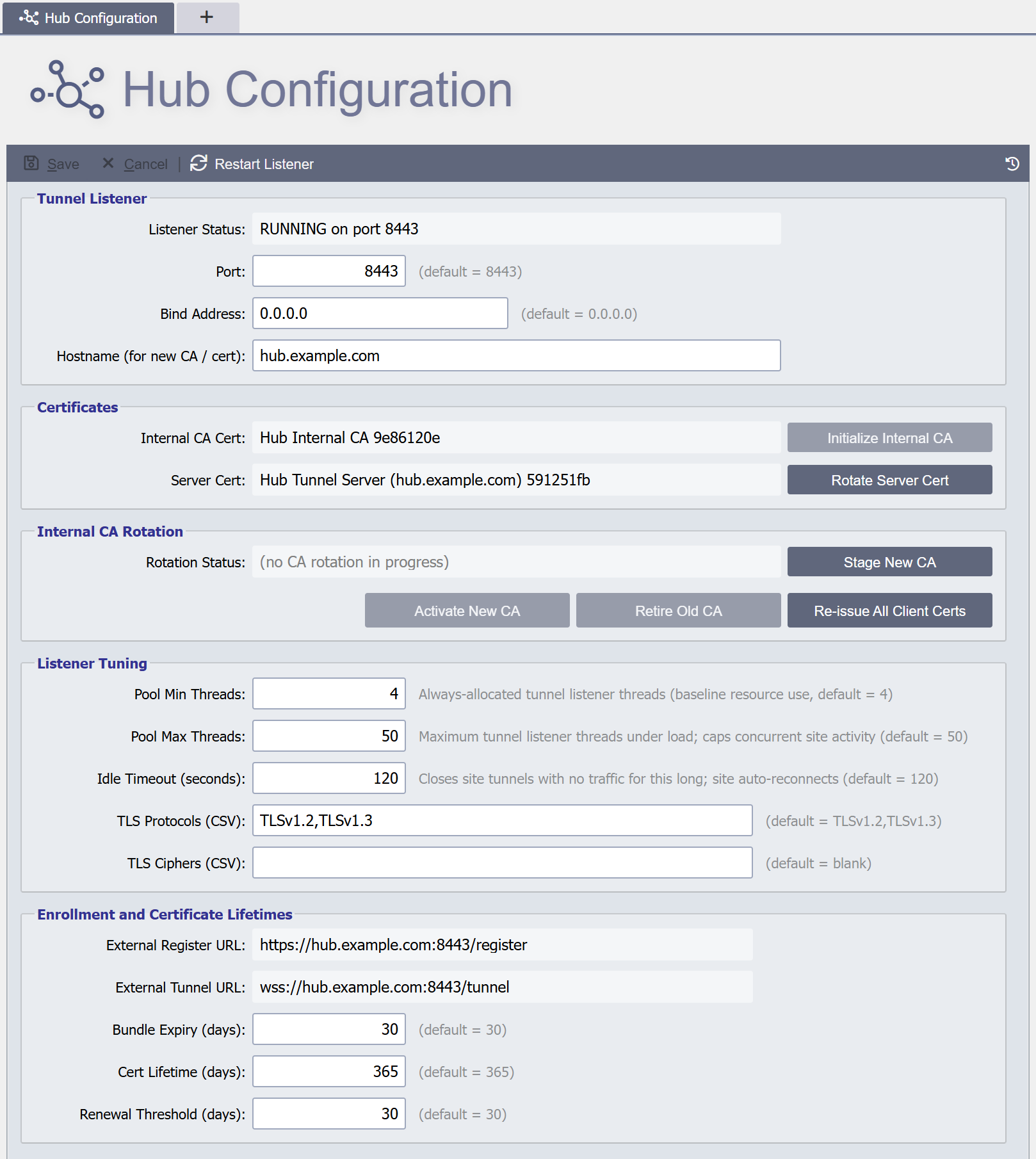
The Hub Configuration page is where you set up the mTLS tunnel listener, the Hub-internal CA, and the listener's server certificate. A fresh Hub starts with the tunnel listener stopped, and no site can enroll until the steps in the setup checklist are done.
Opening the Page
Open System Administration -> Hub Configuration. The page exists only on a Hub, and only administrators see it, because the System Administration folder is built only for administrators.
Setup Checklist
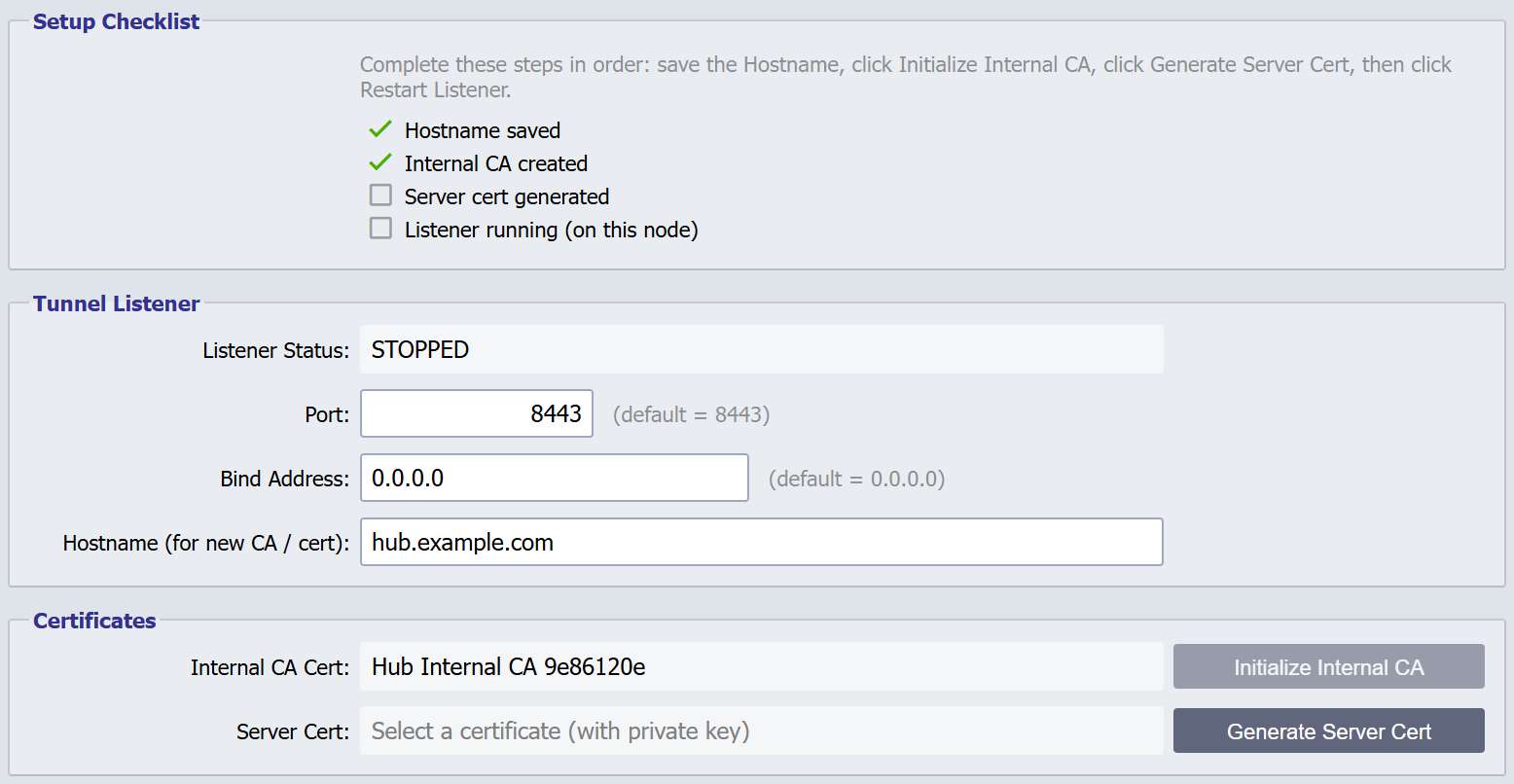
While first-time setup is incomplete, a Setup Checklist sits at the top of the page. It lists four steps and ticks each one that is done:
- Hostname saved: a hostname has been saved.
- Internal CA created: the Hub has an internal CA.
- Server cert generated: the tunnel listener has a server certificate.
- Listener running (on this node): the tunnel listener is running on the Hub node serving the page.
The checklist is worked out from the saved configuration each time the page loads, saves, or finishes an action. It disappears once all four steps are done. It comes back if a step stops being true, for example when the listener stops.
To complete first-time setup:
- Enter Hostname (for new CA / cert) and click Save.
- Click Initialize Internal CA.
- Click Generate Server Cert.
- Click Restart Listener and confirm.
Toolbar
Save: Saves the fields on the page. Save never restarts the listener and never changes a certificate. It does not need any certificate to exist, so a new Hub can save its hostname first. A value the page marks invalid (a port outside 1–65535, an idle timeout under 30) is refused with a message naming the field.
Cancel: Discards unsaved edits and reloads the saved configuration. It does not ask for confirmation, the same as the System Configuration page.
Restart Listener: Restarts the Hub tunnel listener on every Hub node.
It restarts only the listener, never QIE itself. It always asks for
confirmation, because every site tunnel briefly drops and then
reconnects. It needs a saved hostname, internal CA and server
certificate; if one is missing, it reports
Required fields missing: Internal CA Cert, Server Cert, Hostname
(listing only the missing items).
Revision History: Opens the history of the Hub configuration. See Revision History below.
Unsaved Changes
The certificate and CA actions and Restart Listener are refused while the page has unsaved edits. Each of these actions saves its own result straight away and works from the saved configuration, so clicking one with edits pending shows Save or Cancel your current changes first.
Unsaved edits are also kept as a draft, as on the System Configuration page. The draft shows as the top row of the revision history until the edits are saved or canceled.
Tunnel Listener
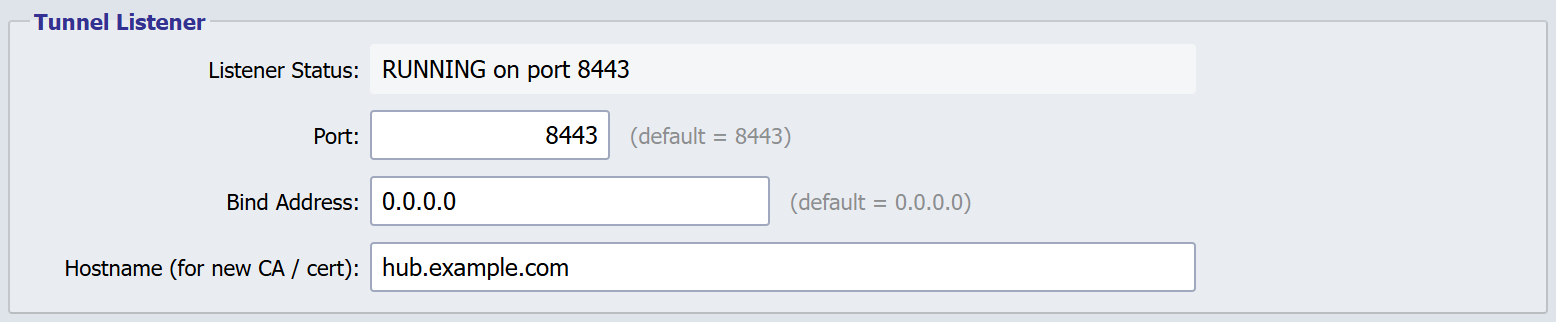
Listener Status
Read-only. Shows the state of the tunnel listener on the Hub node serving the page:
| Value | Meaning |
|---|---|
RUNNING on port N |
The listener is up and accepting tunnels on port N |
STOPPED |
The listener is not running. Either it has never been configured, the configuration is incomplete, or a restart has not finished |
The status reflects what the listener is doing, not what the fields contain. A saved change takes effect when the listener restarts. Restart Listener restarts it, and so do Rotate Server Cert, Stage New CA, Activate New CA and Retire Old CA as part of their work.
Port
The TCP port the tunnel listener binds to (default = 8443). Range 1–65535. Remote QIEs connect to this port with their persistent mTLS WebSocket. It is separate from the dashboard port served by the main Jetty.
Bind Address
The local address the listener binds to (default = 0.0.0.0, all interfaces). Set a specific interface address when the Hub host sits on more than one network and the tunnel listener should be exposed on only one of them.
Hostname (for new CA / cert)
The DNS hostname remote QIEs use to reach this Hub (e.g.
hub.example.com). It becomes the CN/SAN of the server certificate, and
it is embedded in every generated client bundle (.qcb) so remote QIEs
know which URL to dial. Initialize Internal CA, Generate Server
Cert, Rotate Server Cert and Restart Listener all need it.
Warning
If you change the hostname after a server certificate has been generated, the certificate's CN/SAN no longer matches, because the engine verifies the hostname against the certificate's SAN. Save the new hostname, then use Rotate Server Cert to generate and apply a certificate for it in one step. See the server cert rotation workflow.
Certificates

Internal CA Cert
Read-only. The internal-CA certificate that signs client certificates for enrolled sites. It changes only through Initialize Internal CA (when none exists yet) or the CA-rotation ceremony.
Server Cert
Read-only. The certificate the tunnel listener presents to remote QIEs during the mTLS handshake. It changes only through Generate Server Cert and Rotate Server Cert, so Save can never replace the live certificate out from under the fleet.
Initialize Internal CA
The button beside Internal CA Cert, enabled while the Hub has no internal CA and a hostname is entered. Generates a self-signed CA certificate and private key, stores them in the global zone's SSL Certs / Keys tables, and saves the new CA as the internal CA. Requires the hostname, which becomes the CA certificate's subject.
You should only need to do this once per Hub. The internal CA is the root of trust for every client certificate issued to an enrolled site. Replacing it later is the CA-rotation ceremony, not this button.
Generate Server Cert / Rotate Server Cert
The button beside Server Cert. It reads Generate Server Cert until a server certificate is saved, then Rotate Server Cert. Both need the hostname and the internal CA.
Generate Server Cert is first-time setup. It creates a server certificate signed by the internal CA and saves it, without a confirmation and without restarting the listener. Click Restart Listener afterwards to start the listener with it. The Hub refuses Generate once a server certificate exists.
Rotate Server Cert replaces the current certificate. After a confirmation, it generates a new certificate signed by the current internal CA, applies it, and restarts the listener on every Hub node in one step. Because the new certificate is signed by the same CA, sites validate it through the CA and need no action. See the full workflow on the SSL and PKI page.
Note
The two-phase stage → activate → retire server-leaf flow has been replaced by this one-step rotation. Staging is reserved for a future bring-your-own-certificate flow, where a leaf signed by a different CA needs the fleet to add trust before activation.
Internal CA Rotation

Rotation Status
Read-only. Blank when no CA rotation is in progress,
STAGED — new CA: <name> once a new CA is staged, and
ACTIVATED — awaiting Retire of old CA after activation.
Stage New CA / Activate New CA / Retire Old CA / Re-issue All Client Certs
Used together for the rare, fleet-wide rotation of the internal CA itself (the trust anchor), distinct from the server certificate buttons above. Re-issue All Client Certs forces every enabled site to cycle its client certificate under the new CA. New-site enrollment is blocked while a CA rotation is in progress. See Rotating the Internal CA for the full ceremony and the gates that protect each step.
Listener Tuning
Pool Min Threads, Pool Max Threads
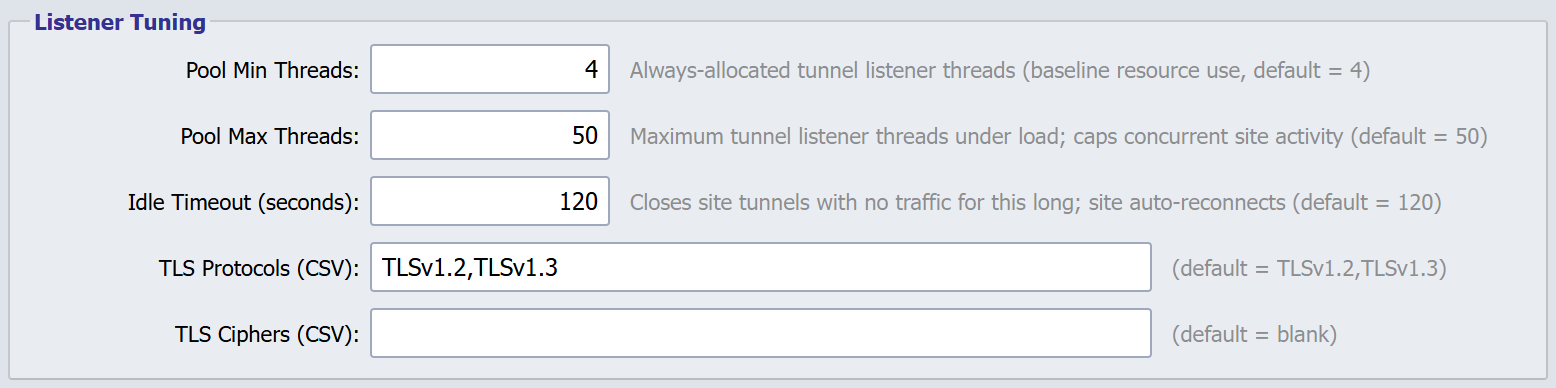
Both fields configure the thread pool that runs the tunnel listener. The pool grows and shrinks on demand between the two bounds:
- Pool Min Threads (default = 4) is the floor. Threads up to this count stay alive even when the pool is idle.
- Pool Max Threads (default = 50) is the ceiling. Work that arrives while every thread is busy and the pool is at its maximum waits for a thread to free up.
The pool size depends on concurrent proxy traffic, not on the number of registered sites. See Sizing the Tunnel Listener Thread Pool.
Idle Timeout (seconds)
Closes site tunnels with no traffic for this long; the site reconnects automatically (default = 120, minimum = 30). Heartbeats are sent every 15 seconds, so a normal tunnel never reaches the idle timeout. It is a safety net for half-open TCP connections.
TLS Protocols (CSV)
Comma-separated list of TLS protocols the listener negotiates (default = TLSv1.2,TLSv1.3). TLSv1.2 is the floor. Older protocols (TLSv1.0, TLSv1.1, SSLv3) are unsupported.
TLS Ciphers (CSV)
Comma-separated list of TLS cipher suites (default = blank). Blank uses Jetty's default cipher list, which already excludes weak suites. Override it only for a compliance regime (FIPS, a customer-mandated allowlist, etc.) that requires an explicit list.
Enrollment and Certificate Lifetimes
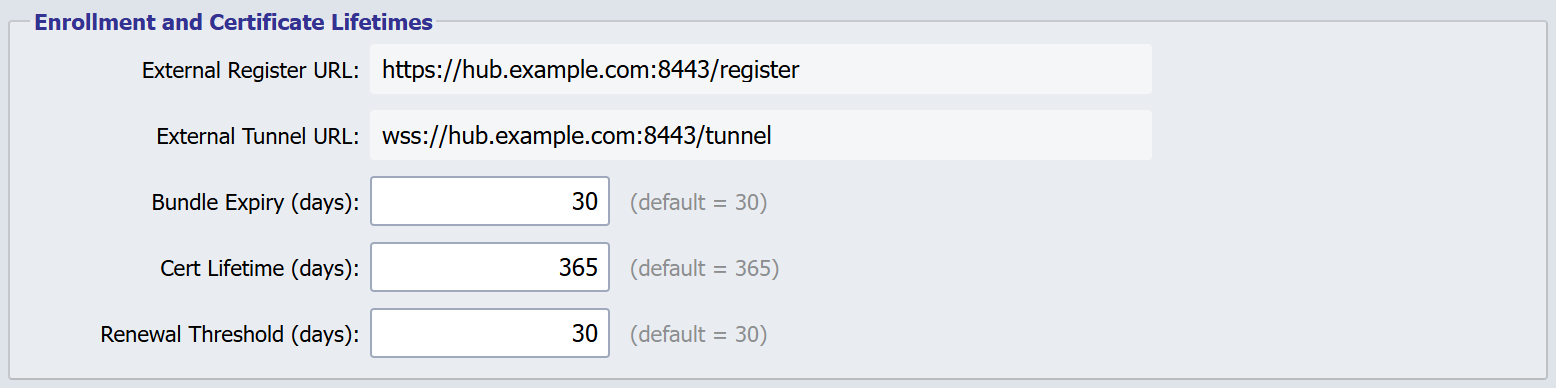
External Register URL / External Tunnel URL
Read-only previews of the URLs embedded in generated client bundles:
| Field | Computed value |
|---|---|
| External Register URL | https://<hostname>:<port>/register |
| External Tunnel URL | wss://<hostname>:<port>/tunnel |
Both update as you edit Hostname (for new CA / cert) or Port. Bundle generation computes the same values from the saved configuration, so save first: the preview is what the next bundle contains once the values are saved.
Bundle Expiry (days)
How many days a generated .qcb bundle remains valid before it can no
longer be redeemed at /register (default = 30). A remote QIE that tries
to register with an expired bundle is refused, and the Hub audits
BUNDLE_EXPIRED_REJECTED. See Enrollment.
Expiry is a backstop, not a recall. To stop a specific bundle being redeemed now, cancel it under Pending Bundles.
Cert Lifetime (days)
Lifetime of the client certificates issued to enrolled sites, and of the server certificate (default = 365). The Hub starts cycling a site's certificate once fewer than the Renewal Threshold (days) remain.
Renewal Threshold (days)
How many days before expiry the Hub begins cycling a site's client
certificate (default = 30). Renewal is Hub-initiated: the Hub's scheduler
sends a CYCLE_CLIENT_CERT_REQUEST over the established tunnel, and the
remote QIE responds with a fresh CSR. Renewal never goes through
/register. See
SSL and PKI.
Restarting the Listener
Restart Listener drops every connected tunnel and restarts the listener on the saved port, on every Hub node. Remote QIEs that already have a valid client certificate reconnect within seconds. The Sites Dashboard briefly shows them red and then green again.
Warning
Restart Listener disconnects every site at once, including anyone proxied into a site. During normal operation, make listener changes in a planned maintenance window. Save the changes at any time, then restart the listener when the window opens.
Revision History
The Revision History icon in the toolbar opens the history of the Hub configuration: each saved change, who made it, and whether it came from an import. Two revisions can be compared side by side. See Revision History.
Revert loads an earlier revision into the page as unsaved changes. The certificates, the CA rotation state and the listener status keep their current values, and a message says so, because they change only through the certificate and CA actions. Click Save to keep the reverted values. While the page has unsaved edits, Revert is refused with Unable to Revert: save or cancel the edits first.
Hub configuration changes also appear in View -> Global Revision History.