Enrolling a Site
Site enrollment is the one-time, out-of-band handshake that pairs a
remote QIE with a Hub. The Hub operator generates a signed .qcb
bundle and delivers it to the site administrator over a trusted channel
(email, sftp, USB, or whatever your organization deems acceptable for
distributing infrastructure credentials). The administrator then imports
it into their QIE.
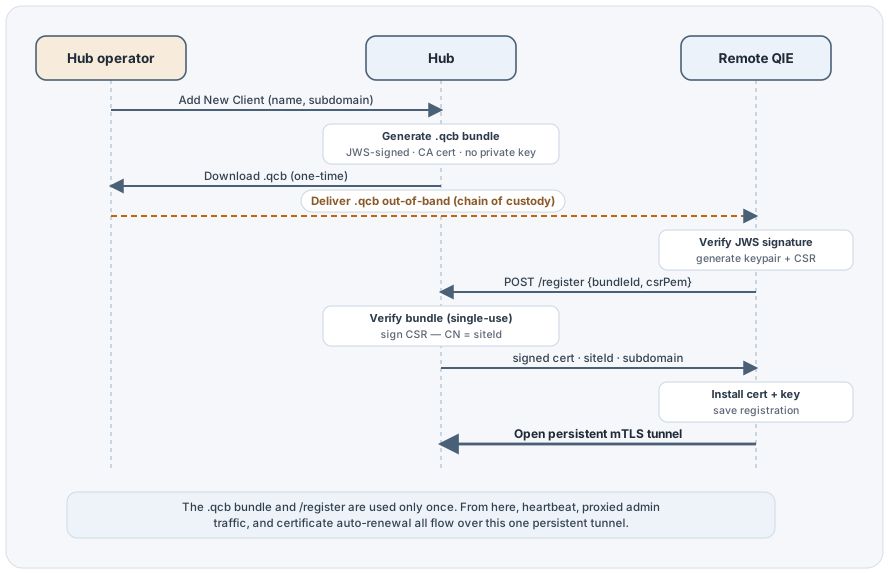
After enrollment, the remote QIE keeps a persistent mTLS tunnel to the
Hub; the .qcb bundle and the /register endpoint are not used again
unless the operator unregisters and re-enrolls the site.
Why bundles, not a self-service signup URL
The Hub deliberately does not expose a public-internet signup
endpoint. The mTLS tunnel listener is the only externally reachable port,
and client certificate authentication is the only way past it. Enrollment
is bootstrapped out-of-band, by physical handover of a signed file
generated by the Hub operator. Authenticity rests on the operator's
chain of custody. There is no way for an attacker who has not been
handed a .qcb file by the operator to enroll a rogue site.
The bundle itself contains no private key. Even if the file is intercepted in transit, the attacker cannot impersonate the intended site: the actual client certificate is issued only after the QIE proves possession of a freshly-generated private key by submitting a CSR. The worst an interceptor can do is consume the bundle once and bind it to their own keypair, and the bundle is single-use, so the legitimate site administrator immediately discovers the situation when their registration attempt fails.
What Is Inside a Bundle
A .qcb file is a JWS compact serialization (three dot-separated
base64url segments) signed with the Hub internal CA's private key.
The signed payload contains:
| Field | Purpose |
|---|---|
bundleId |
UUID, single-use, redeemed at /register |
intendedSiteIdentifier |
UUID that becomes the cert subject CN |
intendedSubdomainLabel |
DNS label the site is reached at via the proxy |
intendedDisplayName |
Customer-friendly name for the dashboard |
intendedDescription |
Optional free-text |
intendedTags |
Optional CSV for grouping/filtering |
hubRegisterUrl |
The /register URL the QIE POSTs the CSR to |
hubTunnelUrl |
The /tunnel URL the QIE opens its WebSocket to |
hubCaCertPem |
The Hub's internal CA certificate (PEM). The QIE pins this CA as its tunnel trust anchor (any server cert the CA signs then validates), used for TLS during /register and for the tunnel |
reenroll |
Present and true only on a recovery bundle. It re-keys an existing site in place instead of creating a new one (see Re-enrolling a Site) |
generatedAt, expiresAt |
Bundle lifetime. Past expiresAt the bundle is rejected |
version |
Bundle schema version for forward compat |
The bundle does not contain a client key or a client cert; both are generated by the QIE during import.
Add New Client (Hub side)
Registering a site counts against the Hub's licensed site count. At the limit, clicking Add New Client reports that instead of opening the dialog: see Registration is refused at the limit.
Open the Sites Dashboard and click Add New Client in the grid toolbar.
Note
A Hub can only issue bundles once its Internal CA Cert, Server Cert and Hostname are all populated. The button stays clickable before then, and clicking it names whichever of the three is unset instead of opening the dialog. Finish Hub Configuration first, then come back.
The Add New Client dialog asks for four fields:
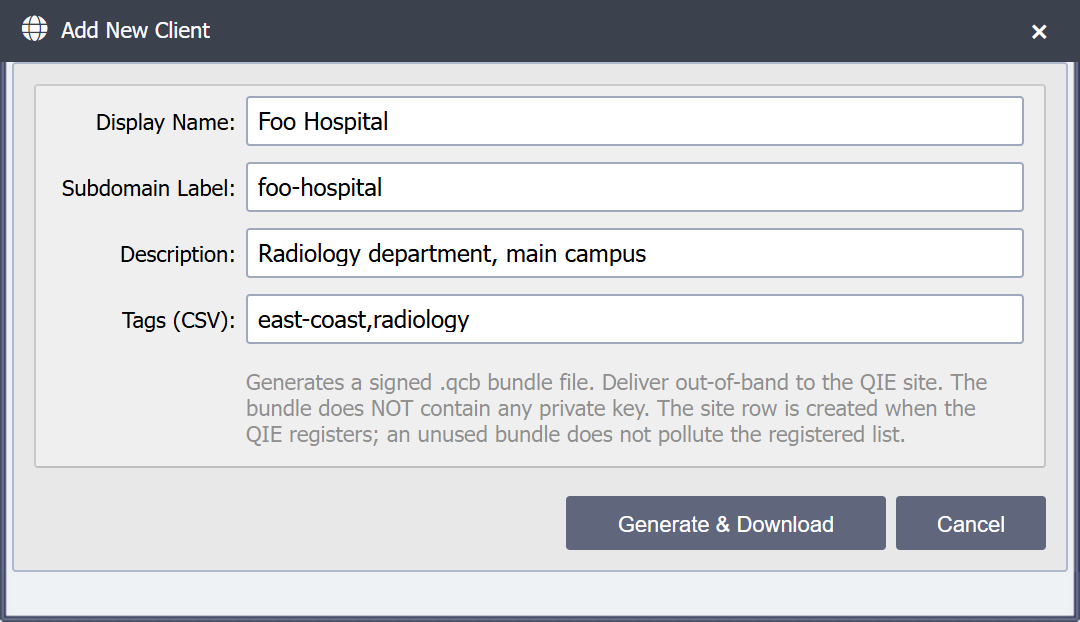
| Field | Required | Purpose |
|---|---|---|
| Display Name | Yes | Operator-friendly name shown on the dashboard. Free-text up to 255 chars. Example: Foo Hospital |
| Subdomain Label | Yes | DNS-safe label used to reach the site via the proxy. Up to 100 chars. Example: foo-hospital (yields site-foo-hospital.hub.example.com) |
| Description | No | Optional free-text up to 1000 chars |
| Tags (CSV) | No | Comma-separated tags for grouping/filtering on the dashboard. Up to 500 chars. Example: east-coast,radiology |
Warning
The subdomain label is immutable after the site is enrolled. The cert subject and the Sites Dashboard grouping reference it directly. Pick a stable, DNS-safe label up front; if you need to rename a site you must unregister and re-enroll it.
Click Generate & Download to:
- Write a
hub_client_bundlerow capturing the intended fields, the bundle UUID, the current Hub server cert (snapshotted into the bundle), and a default 30-day expiry. - Sign the bundle payload as a JWS using the internal CA's private key.
- Stash the JWS bytes server-side and trigger a one-time browser
download via
?type=qcb. - Emit a
BUNDLE_GENERATEDaudit event.
A confirmation dialog shows the file name, bundle ID, intended site identifier, subdomain, and expiry. The download starts immediately.
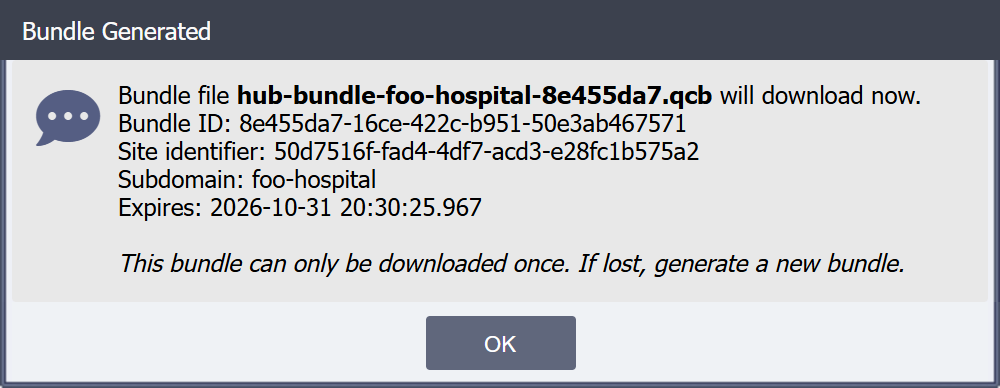
The file is named after the site's subdomain label, so a folder of
bundles stays readable when you add several sites in one sitting:
a site with the subdomain label foo-hospital downloads as
hub-bundle-foo-hospital-<short bundle id>.qcb, and a recovery bundle
for the same site downloads as
hub-recovery-foo-hospital-<short bundle id>.qcb.
One-time download
The .qcb file is downloaded exactly once at generation time.
If you close the dialog before saving the file, or lose the file
later, generate a new bundle from the Sites Dashboard. The old
bundle row remains in the database but cannot produce a second
download.
The pending bundle does not create a Sites Dashboard row. Sites only
appear on the dashboard after a QIE successfully redeems the bundle at
/register, so an unredeemed bundle never pollutes the registered site
list.
Pending Bundles
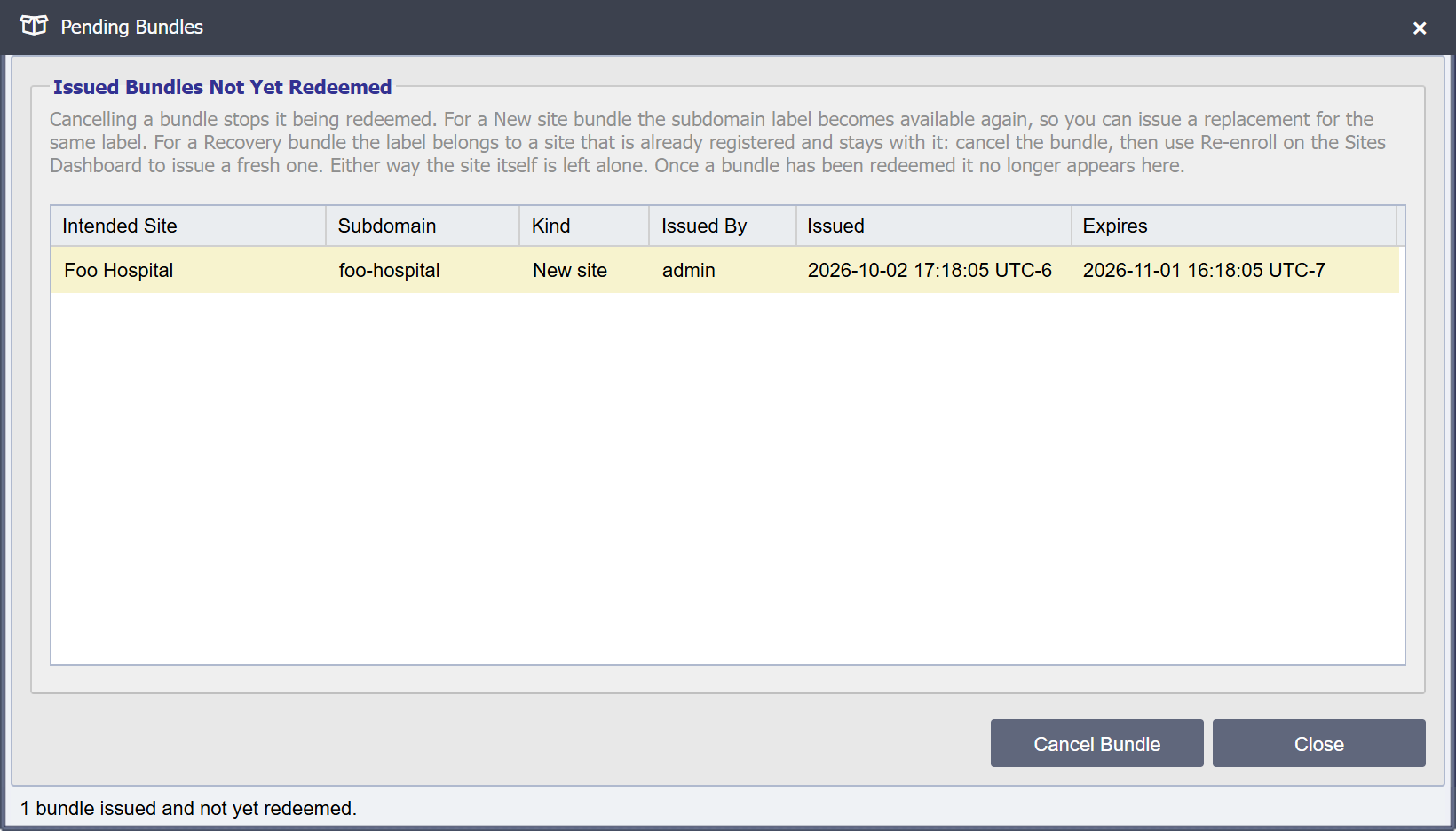
An issued bundle is a bearer credential for a place in your fleet: it carries the Hub CA, the register and tunnel URLs, and the intended site identity. Pending Bundles in the Sites Dashboard toolbar lists the bundles that have been issued and not yet redeemed, with the intended site, subdomain label, whether it is a new-site or recovery bundle, who issued it, and when it was issued and expires. The issued timestamp is what tells two recovery bundles for the same site apart. Expired bundles stay in the list, marked expired, so you can see that one exists and why it will not work. The newest 500 are listed; if there are more, the status bar says so.
Cancel Bundle cancels the selected bundle. Cancel one whenever a bundle should not be redeemed: it went to the wrong recipient, the site was named wrongly, or the plan changed. Waiting out Bundle Expiry Days is not a recall.
Cancelling has three effects:
/registerrefuses the bundle from that moment on, and audits the attempt asBUNDLE_REVOKED_REJECTED.- For a New site bundle the subdomain label is released, so you can issue a replacement for the same label straight away. A Recovery bundle's label belongs to a site that is already registered and stays with it: cancel the bundle, then use Re-enroll to issue a fresh one.
- The cancellation itself is audited as
BUNDLE_REVOKED, recording who did it, and the bundle row is kept so the trail survives.
A bundle that has already been redeemed cannot be cancelled and is not listed: it has produced a site. Delete that site from the Sites Dashboard, or revoke its client certificate, instead.
Register with Hub (engine-mode QIE side)
The site administrator imports the bundle on the remote QIE in the Register with Hub dialog, under System Administration -> System Configuration. See Register with Hub for the dialog, the tunnel controls, and what happens on Confirm Registration.
Recovering a lost registration
A site that has lost its local registration is recovered by
re-enrollment, not by Add New Client. Add New Client mints a new site
identity and orphans the original hub_site row, with its audit history,
access grants, and subdomain. See
Re-enrolling a Site.
Errors and rejection cases
Bundle reuse
Each bundleId is single-use. A second /register attempt against the
same bundle is rejected, the Hub audits BUNDLE_REUSE_REJECTED, and
the QIE displays a registration error indicating the bundle has already
been consumed.
Common causes:
- A bundle was redeemed previously and is being re-imported by mistake.
- An attacker intercepted a
.qcbin transit, redeemed it themselves, and the legitimate site administrator now finds the bundle unusable. Regenerate the bundle, investigate the leak, and revoke the attacker's site cert via the Sites Dashboard.
Bundle expired
Past expiresAt, the bundle is rejected. Hub audits
BUNDLE_EXPIRED_REJECTED. Regenerate a new bundle for the site.
JWS signature mismatch
If the QIE's JWS verification fails (file truncated, tampered, or signed by a different Hub's CA), the QIE rejects the upload at parse time without contacting the Hub. The status bar in the dialog reports the parse failure.
Subdomain conflict
subdomainLabel is unique across enrolled sites and across un-consumed
bundles. If you generate a bundle with a subdomain that is already
taken, the Add New Client dialog reports the conflict at generation
time, not at registration time.
Trust, after enrollment
Once a QIE is enrolled, two cryptographic relationships keep the tunnel secure on every reconnect:
- The Hub verifies the site by validating that the client cert
presented during the mTLS handshake chains to the internal CA (which
enforces expiry) and matches a
hub_siterow by serial. The Hub listener uses a customX509TrustManagerthat consults the database directly, and no JKS truststore is built. - The site verifies the Hub by chain-validating the Hub's server
cert against the internal CA cert it received at enrollment
(stored as
pinned_ca_cert_id), plus a hostname/SAN check. The system trust store is not consulted on the tunnel side. During a CA rotation it trusts both the current and the staged-next CA.
This means:
- A stolen client cert can be revoked in the Sites Dashboard and takes effect within ~15 seconds (revocation is checked on every handshake and every heartbeat).
- The Hub's server cert can be rotated with no fleet coordination at all. A new leaf signed by the same CA validates against the CA every site already trusts. Only rotating the CA itself requires pushing a new trust anchor to the fleet. See Rotate Server Cert and Rotating the internal CA.