Qvera DICOM Router: route, transform and archive medical images

The Qvera DICOM Router speaks native DIMSE and DICOMweb, routes and transforms at tag level, handles DICOM files of any size, and deploys on-premise, in containers, or in your own cloud.

Licensing starts at $9,980 a year. See pricing

What is the Qvera DICOM Router?

The Qvera DICOM Router (QDR) is a healthcare integration engine for medical imaging. It receives DICOM from modalities, PACS, VNAs and archives, applies routing and transformation rules you define, and delivers the result wherever it needs to go — another archive, a cloud imaging service, a research platform, or an HL7 or FHIR feed for the clinical side.

A DICOM router sits between the systems that produce images and the systems that store, read and act on them. It decides where each study goes, based on what is in the study itself. QDR is powered by the Qvera Interface Engine (QIE), which Qvera has developed since 2008. The model is the same: a channel receives a message, condition nodes decide where it goes, mapping nodes change what it contains, and destination nodes deliver it. Rules are written in JavaScript with a built-in Code Wizard, not a proprietary configuration language.

It runs at production scale on a single server, and it handles DICOM files of any size. Both are covered below.

What DICOM does it speak?

The Qvera DICOM Router implements DICOM network communication directly. No gateway product sits in front of it, and nothing extra has to be installed to process DICOM.

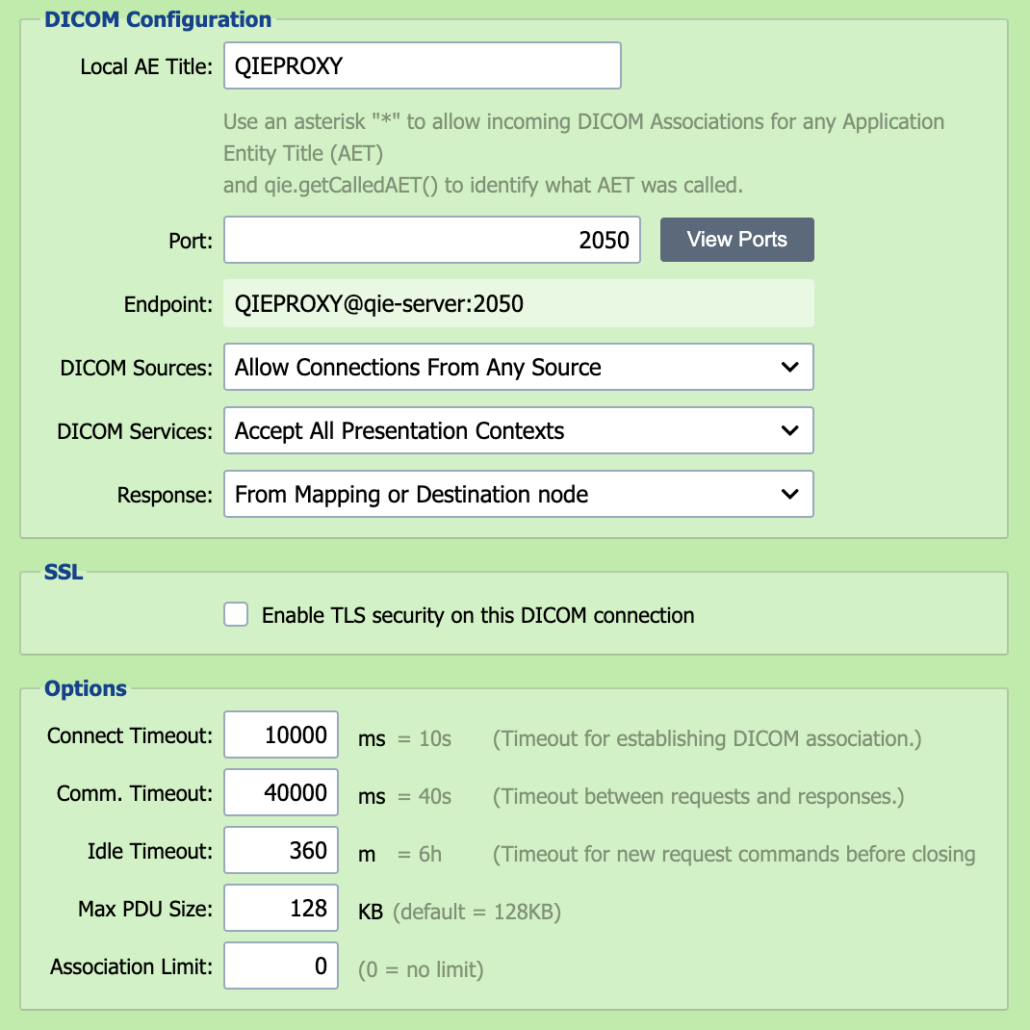
Over DIMSE, QDR is both a service class provider (SCP) and a service class user (SCU): it listens for inbound associations as an SCP and initiates outbound ones as an SCU.

  • C-STORE, C-FIND, C-MOVE, C-GET and C-ECHO
  • Modality Worklist — QDR can answer C-FIND as the worklist source, driven by a database query
  • Association control — negotiated presentation contexts, configurable association limits, maximum PDU size, and timeouts
  • AE title allow-listing — an SCP listener accepts any DICOM source or only the ones you name
  • Presentation contexts configured per SCU connection, with the option to accept contexts automatically when a peer presents one that was not pre-configured
A QDR channel source configured as a DICOM listener: local AE title, port, accepted sources, presentation contexts, TLS and association limits

A channel source configured as a DICOM listener.

Over DICOMweb, QDR supports the full set of web services:

  • QIDO-RS — search for studies, series and instances
  • WADO-RS — retrieve studies, series, instances, metadata, rendered images and thumbnails
  • STOW-RS — store instances to a study or to an archive
  • UPS-RS — create, retrieve, update, search, change the state of and subscribe to Unified Procedure Step workitems

Both directions support TLS, including mutual authentication, using QDR’s own certificate store.

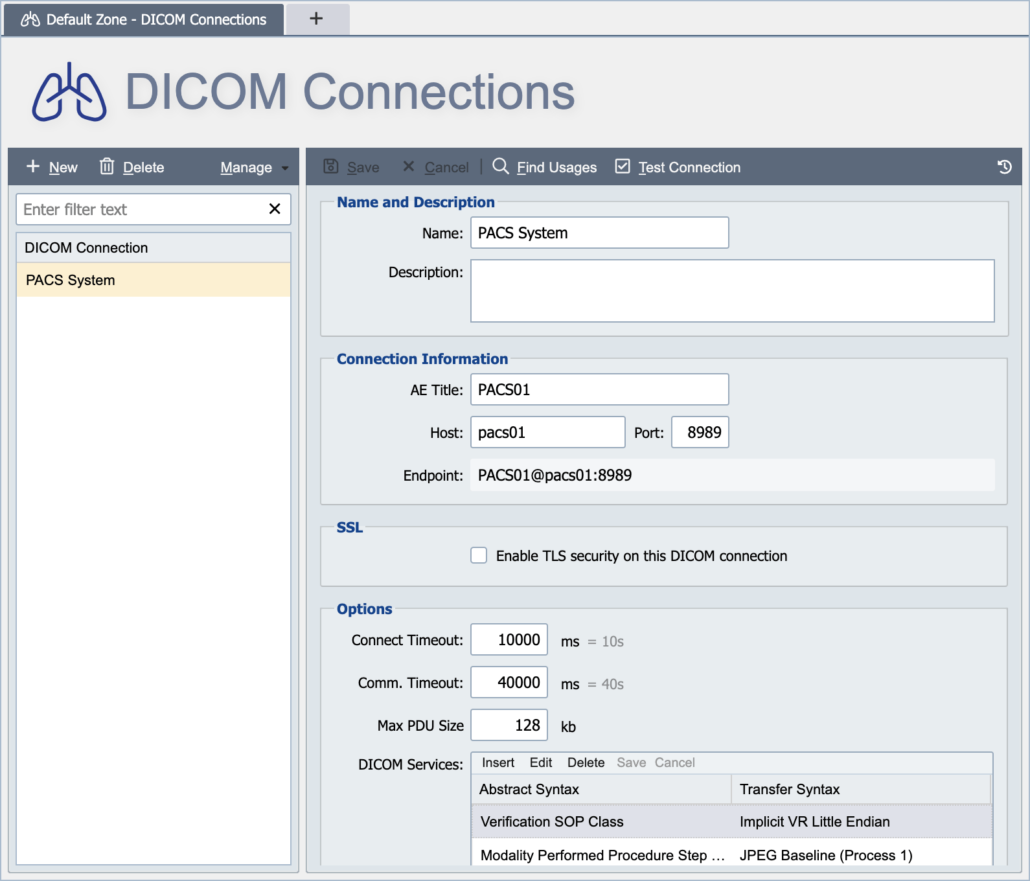
A QDR DICOM connection showing AE title, host and port, TLS, timeouts, maximum PDU size and the negotiated abstract and transfer syntaxes

A DICOM connection, down to the negotiated transfer syntaxes.

How do DICOM routing rules work?

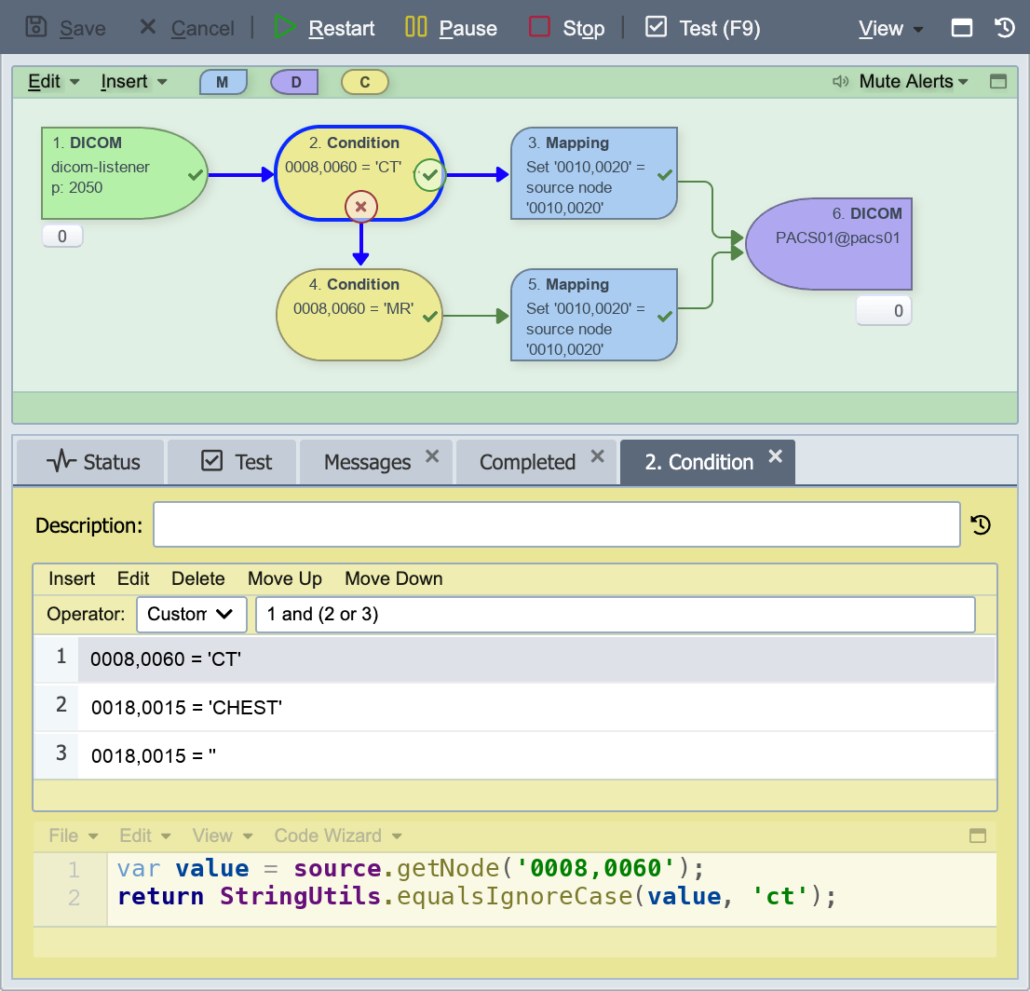
Routing is scripted, so it is not limited to what is inside the study. A condition node is JavaScript: it can match on a DICOM attribute, look a value up in a database, call an external service, combine several tests with your own Boolean logic, or apply whatever rule the workflow actually needs.

For the common case there is no code to write. Any DICOM attribute is addressable by group and element — 0010,0020 for patient ID, 0008,0060 for modality — with wildcards and predicates such as contains, starts with, ends with and equals. You build the rule in the editor, and it generates the script for you.

One message can fan out to several destinations at once: send the study to the archive, a copy to a research platform, and an HL7 ORU to the electronic health record.

A QDR channel routing DICOM studies by modality, with the condition node's rules and generated script below

Routing DICOM studies on modality, and the script behind the rule.

Transformation is tag-level and complete. Mapping nodes read and write every DICOM value representation, operate on whole groups and sequences, merge instances, and change transfer syntax. Private tags resolve through the private creator, and vendor private-tag keywords — including Siemens and Philips tags — display by name rather than as raw hex.

Two capabilities worth naming:

  • Deterministic UID transformation. De-identifying a study normally breaks the link between series, which is what makes de-identified data hard to use. QDR hashes UIDs deterministically — the same input always produces the same output — so studies and series stay linked after de-identification.
  • Transcoding. QDR works with compressed and uncompressed transfer syntaxes, and can re-encode between them — decoding a JPEG2000 study so it can be delivered as Implicit VR Little Endian to a partner that will not accept compressed syntaxes.
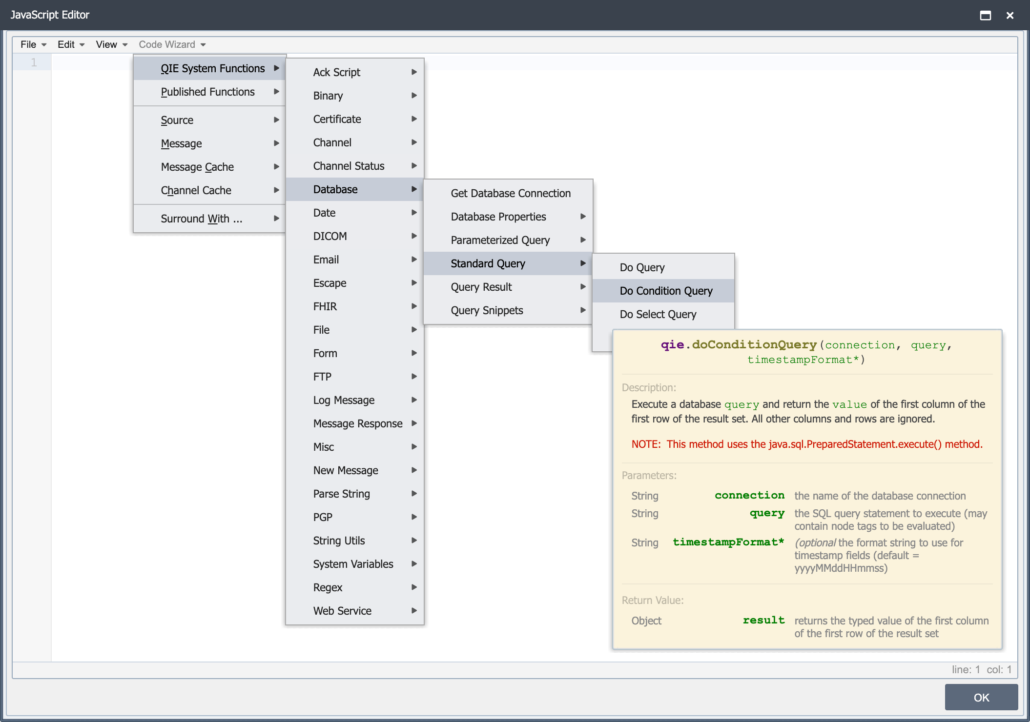
The QDR script editor Code Wizard, with DICOM among the built-in function families and per-function documentation

The Code Wizard, with DICOM among the built-in function families.

How much volume does it handle?

One production instance handles more than 6 million DICOM messages on an average weekday, and has passed 8.4 million in a single day. These are not lightweight metadata records: every one is a full DICOM file carrying image pixel data, and the files are large.

File size is not the limit either. Because pixel data never has to pass through memory, DICOM files of any size — whole-slide imaging, tomosynthesis, gigabyte-plus cine runs — are received, routed and delivered, with the pixel data streamed encrypted to separate storage and reattached on output. Throughput and file size scale independently: a large study does not consume the headroom that message volume needs.

When one server is not enough, nodes share a single database behind a load balancer and the cluster grows horizontally.

Can one engine handle DICOM and HL7 interfaces?

Yes, and that is the point.

Many organizations run one tool for clinical messaging and a second for imaging: two products, two license models, two skill sets, two vendors to call. The Qvera DICOM Router is the same engine as the Qvera Interface Engine, configured for imaging. Not a companion product, not an imaging edition — the same engine, so anything it does for DICOM it also does for HL7 v2 and v3, FHIR, X12, NCPDP, ASTM, CDA and IHE profiles, over MLLP, REST, SFTP, file, database, message queue and network share.

The licensing model is the proof. Qvera offers Per-channel, Enterprise, and OEM licensing models for QIE and QDR. There is no DICOM module, no imaging tier and no per-study charge. An imaging interface and a clinical interface use the same product capabilities.

So a hospital that buys QDR to solve an imaging problem already owns the engine for the clinical side, and a team that learns one of them has learned both.

Read about the Qvera Interface Engine
How does the DICOM Router connect to PACS, VNA and the cloud?

Three connection types cover the imaging environment:

  • DICOM connections speak DIMSE to modalities, PACS, VNAs and workstations.
  • DICOMweb connections reach any PACS, VNA or archive exposing the DICOM web services.
  • Google Cloud Healthcare API is a native connection type with DICOM store support — QDR submits DICOM to it directly, not through a script.

Beyond those, QDR writes to AWS and Azure storage in Qvera-validated configurations used in production today. Deployment itself is unconstrained: on-premise, in containers, or in your own AWS, Azure or Google Cloud account.

See the platforms we connect

How is it deployed and managed?

QDR runs on Windows or Linux, in Docker or Kubernetes from official images, or on AWS ECS. You choose the database — Microsoft SQL Server, MySQL or MariaDB — rather than accepting a proprietary datastore.

For high availability, nodes share one database and run behind a load balancer, with DICOM listener ports in the pool. If a node becomes unavailable, another takes over, and interface processing continues.

Running QDR at more than one site, or inside customer networks you do not control, is what the Remote Management Hub is for: one console for monitoring and controlling engines that sit inside separate networks, over outbound-only connections with no per-site VPN.

Remote Management Hub

How is it secured?

DICOM traffic runs over TLS in both directions, with mutual authentication where the peer supports it, using certificates managed inside QDR.

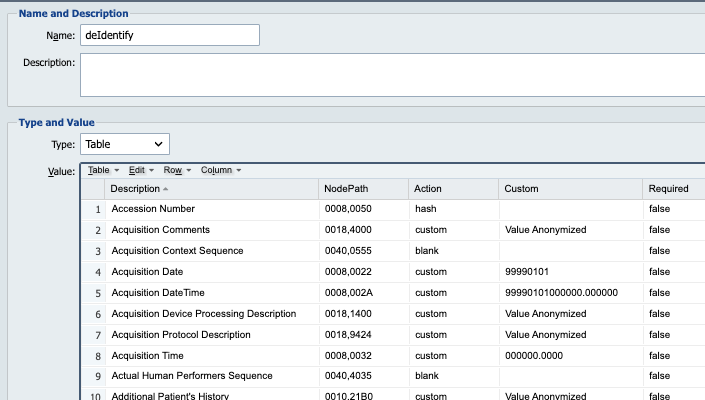
For data leaving the imaging environment, QDR de-identifies at the tag level. A default de-identification table — the DICOM tags that are normally removed — imports in one click, and each tag can be cleared, hashed, replaced with a new UID, or transformed deterministically so linkage survives. The original values can be encrypted into the message itself and restored later by the holder of the private key — de-identification that is reversible for the people entitled to reverse it, and not for anyone else.

Qvera’s own controls are attested under SOC 2 Type 2. For the attestation and how to request the report, see the Qvera security and compliance page.

A QDR de-identification table listing DICOM tags with the action applied to each one — hash, blank or a custom value

The de-identification table.

What do I control, and what does it cost?

Teams evaluating an imaging router are usually trying to avoid being locked in. QDR is a commercial product, and these are the places that normally matter:

  • Interfaces are scripted in JavaScript, with a built-in Code Wizard and an AI Companion that can generate DICOM tag paths and mappings from a plain-English description. JavaScript is not a proprietary scripting language, so the skill transfers and the people who can maintain it are not rare.
  • You choose the database. Microsoft SQL Server, MySQL or MariaDB.
  • You choose where it runs. On-premise, in containers, or in your own cloud account. Your data stays in your infrastructure.
  • Licensing fits your deployment. Qvera offers Per-channel, Enterprise, and OEM licensing models for QIE and QDR — no DICOM module, no imaging tier, and no per-study or per-image charge.
  • It is supported, with 24/7 coverage for system-down emergencies.

Pricing. Qvera offers Per-channel, Enterprise, and OEM licensing models for QIE and QDR. Per-channel licensing starts at $9,980 per year. View Qvera Licensing and Pricing.

Where is the Qvera DICOM Router running today?

QIE and QDR are in production at more than 600 sites, running more than 25,000 interfaces and processing more than 50 million messages a day. Qvera has built healthcare interface engine software since 2008 and is SOC 2 Type 2 attested.

 
GE HealthCare
Change Healthcare
Philips
Fujifilm
IBM
Agfa HealthCare
Novarad
Sectra
Carestream
Infinitt
Intelerad
Siemens Healthineers
© Copyright 2026 - Qvera - All rights reserved  |  Privacy Policy