Remote Management Hub (RMH)

The Remote Management Hub monitors and controls QIE instances running inside separate customer networks from a single console.

What is the Remote Management Hub?

The Remote Management Hub (RMH) is QIE running in a management mode. Instead of processing messages, it aggregates every QIE site you operate into one dashboard, and lets you open any site’s own administration console from there.

It exists for one reason. Once QIE runs at many sites, on networks you do not control, opening a VPN into each one for routine work stops being practical. RMH replaces that with a single console that reaches every site.

It is the same software your team already knows: the same installer, the same login, the same administration screens, started in a mode that manages other QIE instances rather than running interfaces itself.

How does it reach QIE instances inside another network?

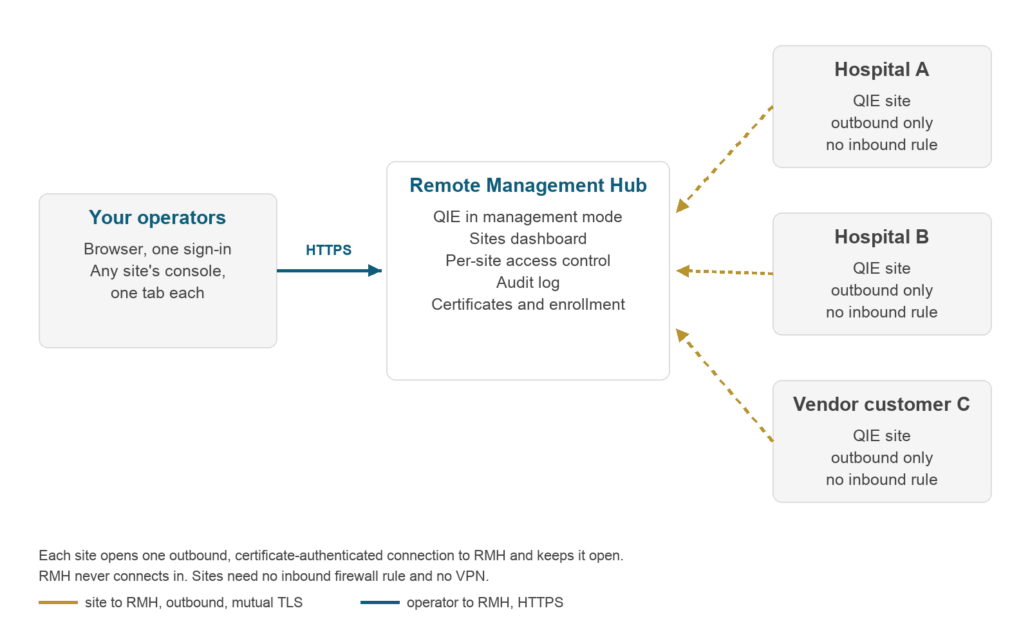
Each QIE site opens one outbound, certificate-authenticated connection to RMH and keeps it open. RMH never connects in. The site’s firewall needs no inbound rule, and nobody needs a VPN. Through that connection RMH receives each site’s status every few seconds and carries your administrative session when you open the site’s console.

RMH carries administrative sessions and status. Interface message traffic never routes through it. Messages continue to flow directly between each site’s QIE and the systems it integrates, exactly as they do without RMH.

Diagram: operators reach the Remote Management Hub over HTTPS; each QIE site opens one outbound, mutual-TLS connection to RMH, with no inbound firewall rule

What can you see and do from one console?

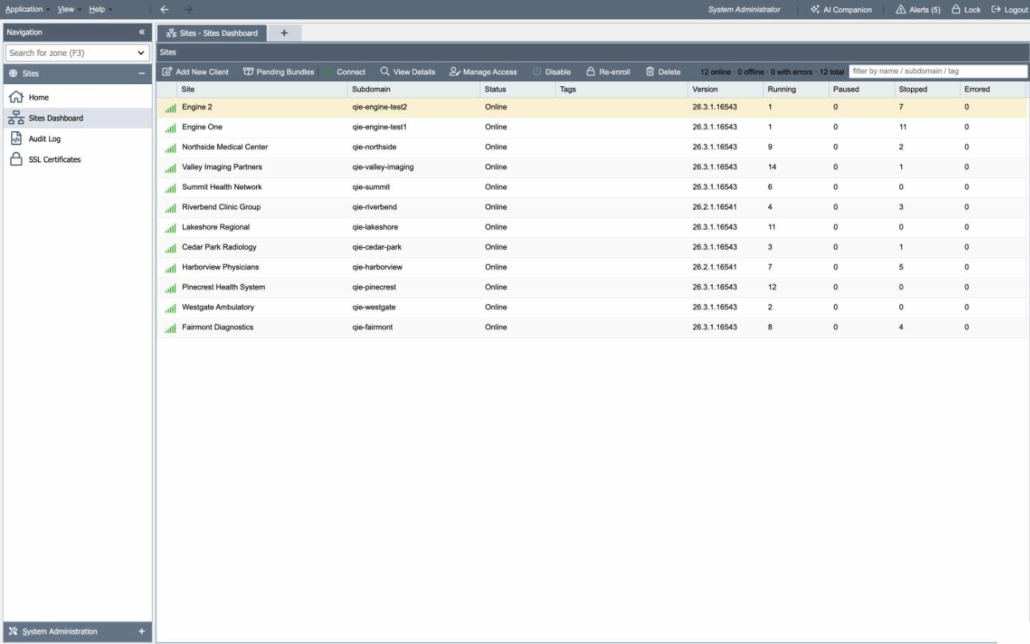
The Sites Dashboard lists every registered site and refreshes continuously from each site’s status reports. For each site you see whether it is online, which QIE version it runs, how many channels are running, paused, stopped or errored, its queue depths, and its memory and thread usage. Filter by name, subdomain or tag when the list is long.

To work on a site, select it and connect. Its own administration console opens in a new browser tab, through RMH, and you sign in to it with that site’s own login. Everything you can do in that console when you are on site, you can do from here.

Around that sit the controls a fleet needs: per-site access grants by user or role, an audit log of every meaningful action, certificate management for every enrolled site, and enrollment of new sites.

Remote Management Hub (RMH) Sites Dashboard listing enrolled QIE sites with status, QIE version and channel counts, one site selected

The Remote Management Hub Sites Dashboard.

How are sites enrolled, and how is it secured?

Enrollment is a one-time, out-of-band handshake. An RMH operator generates a signed, single-use enrollment file and hands it to the site administrator. The file contains no private key. The site generates its own key, proves possession of it, and only then receives its certificate. There is no public sign-up endpoint, so nobody who has not been handed that file by your operator can enroll a site.

From then on, security rests on facts a reviewer can check:

  • Every connection is opened outbound by the site and authenticated with mutual TLS against an internal certificate authority that RMH operates. TLS 1.2 is the minimum.
  • A lost or stolen site certificate can be revoked from the dashboard and stops working within about fifteen seconds. Site certificates renew automatically.
  • Access is granted per site, to a user or to a role. An operator without a grant cannot open that site and does not see it.
  • Every meaningful action, from sign-in to opening a site to revoking a certificate, is written to an audit log in both the database and a file you can ship to your SIEM.
  • RMH stores no site credentials and injects none. You sign in to RMH with the same local, LDAP or OpenID Connect login QIE uses, and to each site with that site’s own login.

Qvera’s own controls are attested under SOC 2 Type 2. For the attestation and how to request the report, see support and security.

The Register with Hub dialog in QIE, showing a site's tunnel status, its registered Remote Management Hub, site identifier and client certificate serial, and the option to replace its registration with a new enrollment bundle

Registering a QIE site with the Remote Management Hub.

Who is it for?

Anyone running QIE at many sites, from a regional health system to a software vendor with a fleet of customer installations.

  • Health systems and imaging groups running QIE at several facilities, each on its own network, who want one place to see every engine and one way in to each of them.
  • Healthcare software vendors who embed QIE in their own product and deploy it inside their customers’ networks. RMH is how a vendor supports a deployed fleet without a VPN into every customer.

RMH is available with every QIE licensing model. It is not limited to vendor deployments.

Is this different from a monitoring dashboard?

Yes, and the difference is the network. A monitoring console shows you the status of engines you can already reach. RMH gives you a working administrative session into engines on networks you cannot reach, without a VPN to each one, because every site connects out to RMH rather than RMH connecting in.

Status is part of it, and the dashboard shows it. But the thing that changes how a team works is being able to open any site’s console from one place and act.

RMH manages QIE. For how QIE compares with other engines, including their management consoles, see Mirth Connect alternatives.

How is it deployed, and does it run highly available?

RMH is QIE, started in management mode, so it runs wherever QIE runs: on-premise, in containers, or in your own cloud on AWS, Azure or Google Cloud, against MSSQL, MySQL or MariaDB. It needs a hostname and a wildcard TLS certificate, because each site’s console is opened on its own subdomain so that browser sessions to different sites stay isolated from each other.

For high availability, several RMH nodes run behind a load balancer against a shared database. If a node fails, its sites reconnect to a surviving node on their own, and operators keep working.

How is it licensed?

The Remote Management Hub is available as an add-on to any plan. It is licensed separately from QIE itself and works with all three QIE licensing models: per-channel, Enterprise and OEM.

An RMH license is sized by the number of sites you register with it. Prices in USD. Final pricing is confirmed with Qvera sales.

Where is QIE running today?

QIE is in production today at more than 600 sites, running more than 25,000 interfaces and processing more than 50 million messages a day. Individual deployments range from a single clinic to more than 10 million messages a day in a single QIE instance.

Qvera has built healthcare integration engine software since 2008. Support is by email and phone, with a dedicated account representative and 24/7 coverage for system-down emergencies.

© Copyright 2026 - Qvera - All rights reserved  |  Privacy Policy