Qvera Interface Engine (QIE)
HL7 interface engine with full DICOM networking
One engine for HL7, FHIR, DICOM and X12, with HA available on every license.
Licensing starts at $9,980 a year. See pricing


Deployed on-premise, in containers, or in your own cloud. Individual deployments range from a single clinic to more than 10 million messages a day in a single QIE instance. Qvera has been building healthcare integration engine software since 2008.
















The Qvera Interface Engine (QIE) is a healthcare integration engine that connects clinical, imaging and administrative systems so they exchange data reliably.
QIE connects electronic health records, imaging systems, laboratory and billing systems and the applications around them, for hospitals and health systems, imaging centers, ambulatory and specialty practices, and the healthcare software vendors who license QIE and embed it in their own products.
Many organizations end up running one tool for clinical messaging and a second for imaging. QIE handles both in one engine, so clinical and imaging interfaces run on the same platform, with one vendor to call and one skill set for the team that runs it.
Three things set QIE apart: DICOM networking (store, query, retrieve and worklist) and header de-identification in the same engine as your HL7 and FHIR interfaces, a built-in converter for Mirth Connect channels, and high availability on every licensing model.
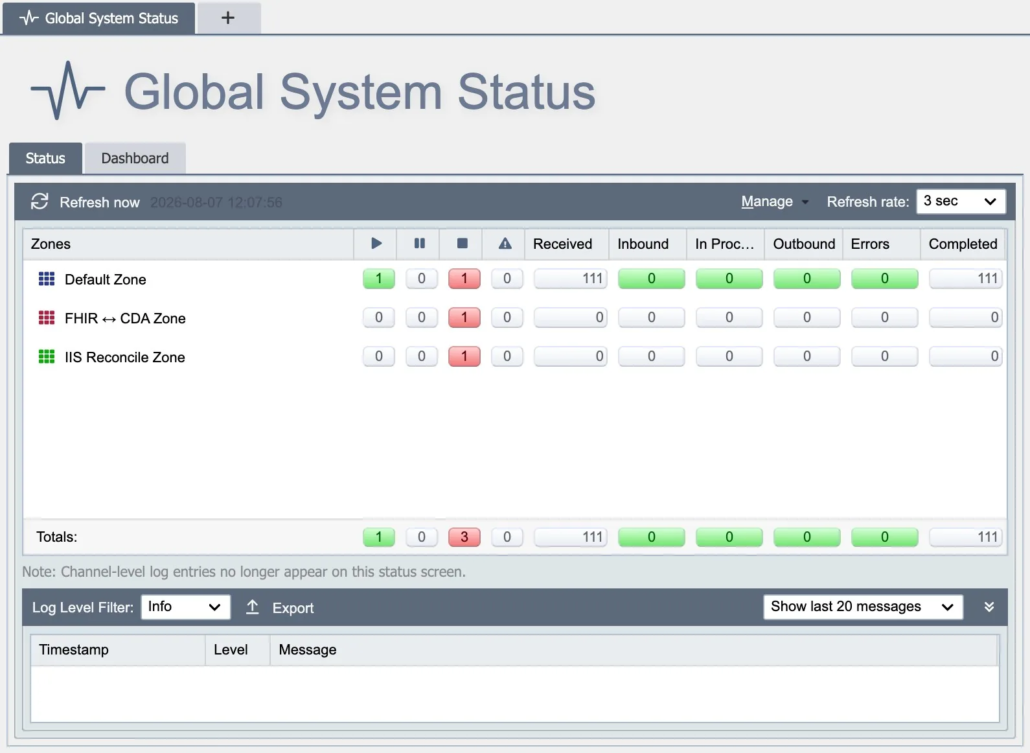
The global system status page: every channel, its state and its queues on one screen.
QIE speaks the standards healthcare systems actually use: HL7 v2 and v3, FHIR, DICOM including native DIMSE, X12, NCPDP, ASTM, CDA and the IHE profiles. Messages move over MLLP, REST, SFTP, file, database, message queue and SMB network share.
Because DICOM support is native rather than added on, the engine that routes an ADT feed can also route studies between modalities, PACS and a VNA, and a legacy DIMSE device can be bridged to a cloud imaging platform without a second product. The complete list of message formats, and what each one supports, is on the Supported Message Formats page in the documentation.
An interface in QIE is a channel. A channel has a source that receives or fetches messages, one or more destinations that deliver them, and a chain of nodes between the two that filter, map and transform. You assemble the channel visually, test it against real messages, and watch it run from the same screen. Nothing about its structure is hidden in configuration files.
A change is tested against saved messages before it is promoted, and the global system status page shows every channel, its state and its queue depth on one screen, so the person on call sees a stalled interface before the department does.
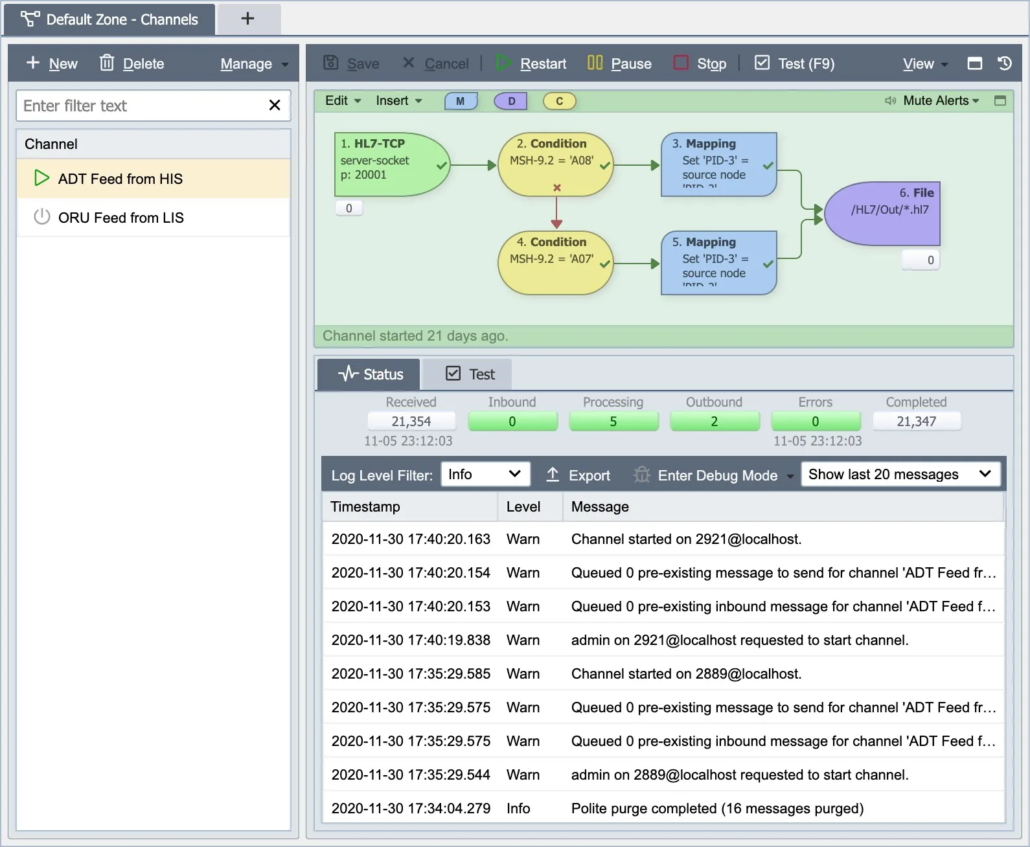
A channel, with its source, nodes and destination.
The logic inside a node is JavaScript, the language your team already knows, and built-in mapping functions produce the field-level JavaScript for you, while the Code Wizard lists helper functions and inserts ready-made code. JavaScript is one of the most widely used programming languages, so the skills your team needs to build and maintain interfaces are common ones.
The documentation walks through building a first channel step by step.
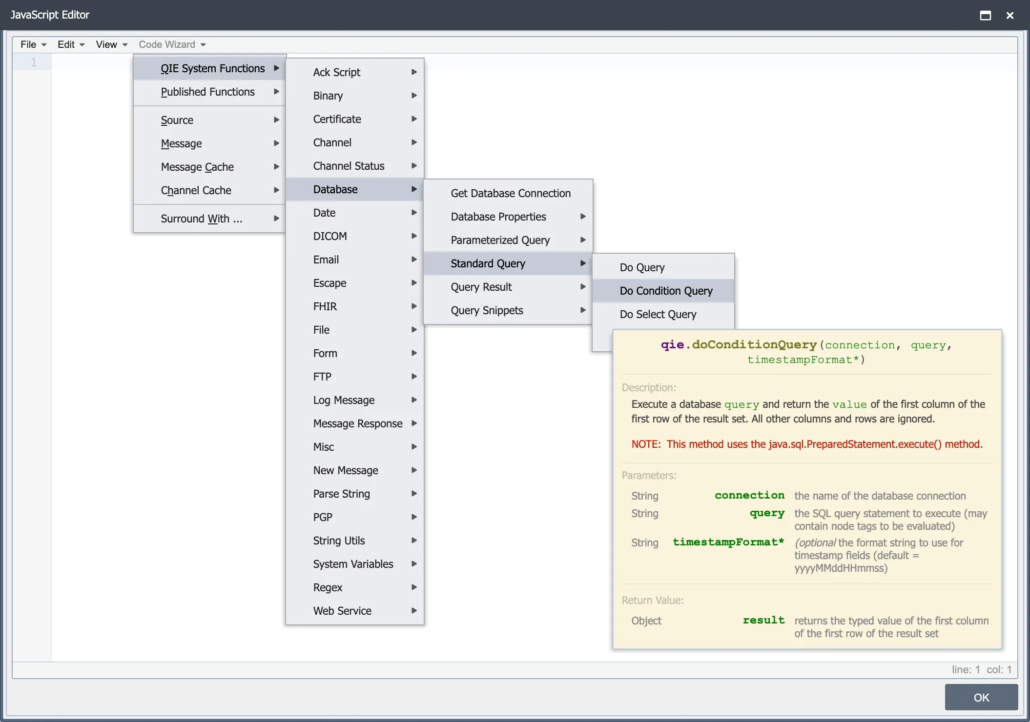
The JavaScript editor with the Code Wizard.
The AI Companion is built into QIE, and it knows QIE. Ask it a question about the engine and it answers inside the console. Describe what a mapping should do and it generates the JavaScript against QIE’s own bindings, without your team writing the code by hand. Point it at an erred message and it explains what went wrong and how to fix it, and it reads QIE’s log output and error queues to help troubleshoot connectivity. It works across every message model QIE supports.
Channels can also call a model directly: a dedicated AI web service connection type lets a channel send a message to a model and act on the response the same way it calls any other web service.
The Companion assists your engineers rather than replacing them. A script it drafts goes into your channel only when an engineer accepts it.
QIE runs on-premise, in containers, or in your own cloud on AWS, Azure or Google Cloud. It is the same engine and the same console wherever it runs, and it stores its data in Microsoft SQL Server, MySQL or MariaDB.
There is no proprietary datastore, so backups, monitoring and access control follow the practices your database team already has. The database can run on your own servers or as a managed cloud service, including Amazon RDS, Amazon Aurora and Azure Database for MySQL.
For containers, Qvera publishes official QIE images on Docker Hub and Amazon ECR, ready for Kubernetes or Docker Compose, and nodes can be added to or removed from a running cluster. High availability is available on every licensing model: two or more QIE nodes share one database, and if one becomes unavailable, another takes over its processing automatically.
The documentation covers each path step by step: the Install Guide for Windows and Linux servers, the Container Guide for Kubernetes and Docker, the AWS ECS Install Guide, and High Availability for clustering.
The Remote Management Hub (RMH) monitors and controls QIE instances running inside separate customer networks from a single console. Each site connects outbound to RMH, so there is no VPN into every customer and no inbound firewall rule to negotiate, and you can open any site’s own administration console from one place. RMH is available as an add-on with every QIE licensing model.
Security. Read about Qvera’s SOC 2 Type 2 attestation, QIE security controls, and how to request the report on our security and compliance page.
Pricing. Qvera offers Channel-based, Enterprise, and OEM licensing models for QIE and QDR. Channel-based licensing starts at $9,980 per year for 2 channels. View Qvera Licensing and Pricing.

Nexus Health Systems
Nexus Health Systems moved every interface from iNTERFACEWARE Iguana to QIE without rewriting them or interrupting message flow, using the AI Companion.
Read the case study →
QuadMed
During its transition to Epic, QuadMed used QIE to adapt immunization data to different state reporting requirements and consolidate outbound immunizations into a single channel.
Read the case study →
Revere Health
Revere Health replaced an aging interface engine with QIE, expanded data exchange around its TouchWorks environment, and reduced its reliance on outside consultants.
Read the case study →